.jpg?width=50&height=50&name=Johnny%20Headshot%2005%2013%20Low%20Res%20(10%20of%2013).jpg)
Key takeaways
- A new series on Power BI and Databricks: Follow Borp, an Enterprise Power BI developer, as he learns to build semantic models on a Databricks platform.
- SpaceParts data is on the Databricks Marketplace: The free SpaceParts Co. dataset is now available as a Delta Share so you can follow along.
- You'll need the right Databricks access: Setting up the dataset requires a workspace and Unity Catalog permissions, or you can use the free Databricks Free Edition.
- Tabular Editor fits right in: The series shows how to connect Tabular Editor to Databricks and use it to build better data models faster.
This summary is produced by the author, and not by AI.
The setup
SpaceParts Co. is preparing to release a new data platform built on Databricks. Borp, an Enterprise Power BI developer, now needs to understand how Databricks changes the way they find data, prepare models, and use Tabular Editor.
Until now, Borp has mostly worked with CSV files and relational databases such as SQL Server. Databricks introduces lakehouse concepts, Unity Catalog, SQL Warehouses, and new connection details, so the starting point is less obvious than it is for a traditional data warehouse.
This series follows Borp through that learning path: accessing Databricks, finding the right data, and connecting Tabular Editor when it is time to build the semantic model.
This article starts the series with the setup needed before the Databricks and Power BI workflow can begin.
What the series covers
In this series of articles and videos, we’ll give an overview of how Power BI developers can use Databricks, and how Tabular Editor fits into that work.
We won’t spend all our time in Tabular Editor. We’ll look at what Databricks is, how to navigate the workspace, which features matter for Power BI developers, and how to connect Tabular Editor once the Databricks prerequisites are in place.
We’ll also introduce some handy scripts you can use in conjunction with Databricks and Tabular Editor to take your semantic models to the next level.
SpaceParts Co. data
If you would like to follow along as Borp gets to grips with using the new data platform, we have some great news – the SpaceParts Co dataset is now available on the Databricks Marketplace!
The Databricks Marketplace is an open forum for exchanging data products. On it, you can find Databricks integrations through their Partner Connect network, Solution Accelerators, AI Models, and datasets.
The SpaceParts Co dataset has been set up as a free asset that you can set up to help with learning how to use Tabular Editor with Databricks. The dataset utilizes Delta Sharing, an open protocol developed by Databricks for secure data sharing with other organizations.
Getting set up
In order to set up a dataset as a consumer in Databricks Marketplace, you need access to a Databricks workspace, and you’ll need specific permissions within Unity Catalog. It may be that you require a Databricks Administrator to set this up on your behalf.
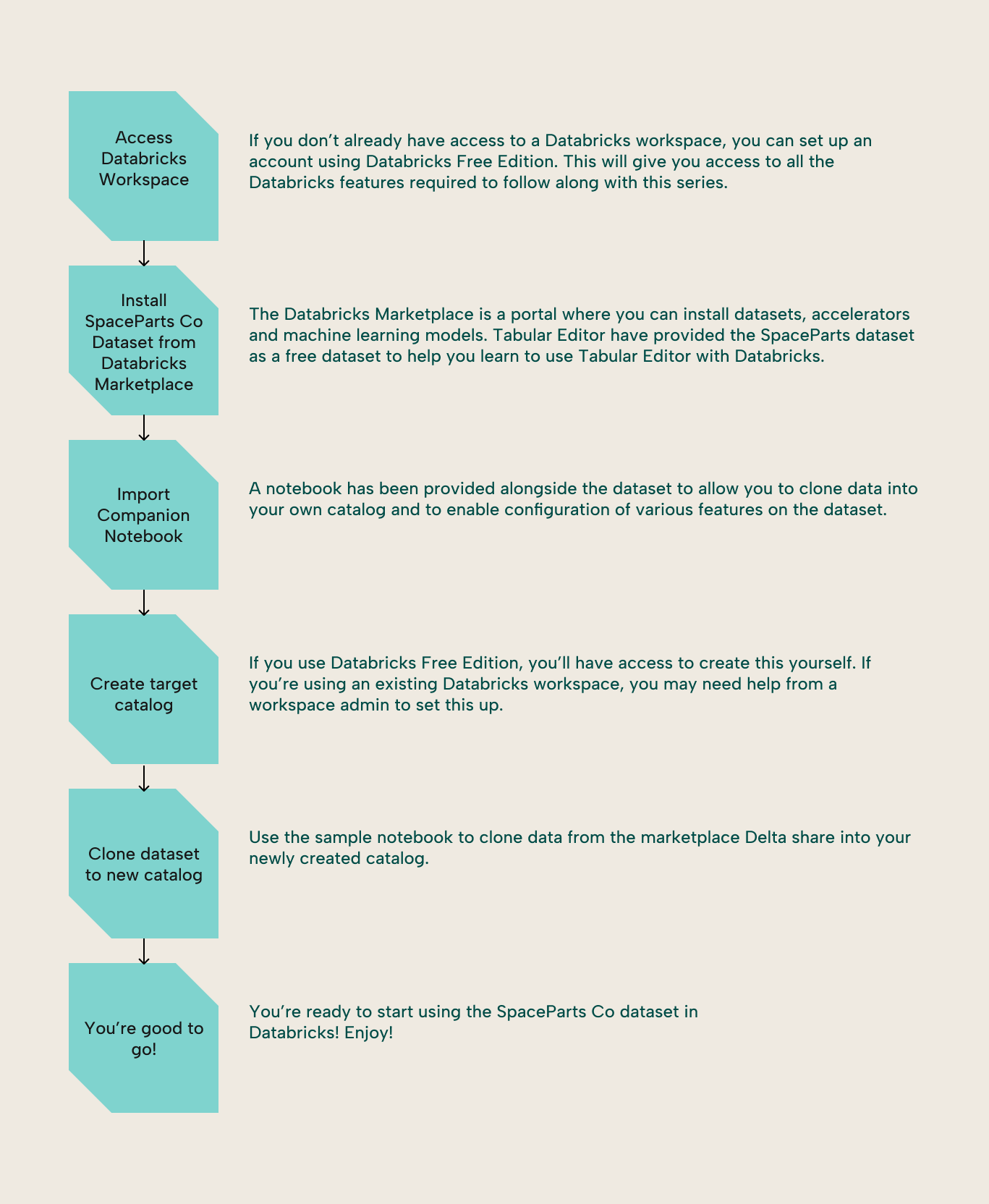
Here’s what’s required:
- Create catalog and use provider permissions on the Unity Catalog metastore attached to your workspace. These allow you to manage shared data products.
- Alternatively, if you don’t have these permissions, you need the metastore admin role, which grants broader access.
- Additionally, you must have the use marketplace assets privilege on the Unity Catalog metastore. This is enabled by default but can be restricted by an admin.
If your workspace was automatically enabled for Unity Catalog, the workspace admin has these permissions and can grant them to other users. You can request access from your Databricks account admin or metastore admin if needed.
Alternative to the above, you can sign up for the Databricks Free Edition. The free edition provides you with all the features required to follow along with this series, including admin rights for any configuration required.
In addition to setting up the SpaceParts Co dataset as a delta share, we also recommend that you clone the data into your own Databricks catalog. This enables the use of additional features that aren't currently supported by Delta Shares, as well as moving the data to your own tenant and region. We’ve included a notebook with the dataset to make this nice and easy.
Once you’re set up, you’re ready to follow along with Borp as he familiarizes himself with Databricks and how he can build Power BI semantic models with Tabular Editor to build better data models faster.
The next article in the series is part 2, What is Databricks? A guide for Power BI developers, which explains the Databricks platform and the lakehouse concepts behind the workflow.
For further reading
- What is Databricks? A guide for Power BI developers (Tabular Editor). Explains what Databricks is as a platform and how lakehouse architecture differs from the relational data warehouses Borp is used to.
- Semantic modelling patterns with Power BI and Databricks (Tabular Editor). Covers advanced design patterns for Databricks-backed semantic models, including Metric Views and lakehouse-specific modeling considerations.
- What is Delta Lake in Azure Databricks? (Microsoft Learn). Background on Delta Lake, the open table format behind the SpaceParts dataset and the storage layer you’ll encounter throughout a Databricks workspace.
- What is Unity Catalog? (Microsoft Learn). Overview of the permissions model referenced when granting access to the shared dataset.
In conclusion
That's the stage set: SpaceParts Co. is moving onto Databricks, and Borp has a lot of questions. Over this series we'll answer them, starting from what Databricks even is, through navigating its interface, all the way to connecting Tabular Editor so you can keep building great semantic models. Get the SpaceParts dataset set up, and watch out for the next part where we give an overview of Databricks.
Start your Databricks-to-semantic-model workflow with Tabular Editor.
Give Tabular Editor a spin