
Key takeaways
- Descriptions document your fields: They provide useful information about fields and how to use them for developers, users, and AI. The main purpose of a description though is to help people understand your model and better use it.
- Make hidden information explicit: Good descriptions provide information not already obvious from the object name and properties; be concise and structured, give information that's informative or actionable, and review any AI-generated descriptions.
- Good descriptions for AI are different than good descriptions for users and developers: AI needs different information than users, because they aren't doing the same thing, so a description written for an agent often looks very different from one written for a person. Descriptions aren’t AI-only context; they are still relevant and valuable for human users and developers.
- Descriptions and other context or metadata should be first-class citizens: In the past, we semantic model developers often neglected descriptions and other context fields as optional model hygiene. Now, with AI, they are on the critical path to help us scale when using AI in analytics and agentic development.
This summary is produced by the author, and not by AI.
What are descriptions and why are they important
In a Power BI semantic model you can set freeform text fields for each object (like tables, columns, and measures) to describe what they do, how to use them, or other information. These descriptions are a convenient and structured way to document each object for developers. They’re also helpful for users, since the descriptions (unlike DAX expressions) show when you hover on the object in Power BI Desktop:
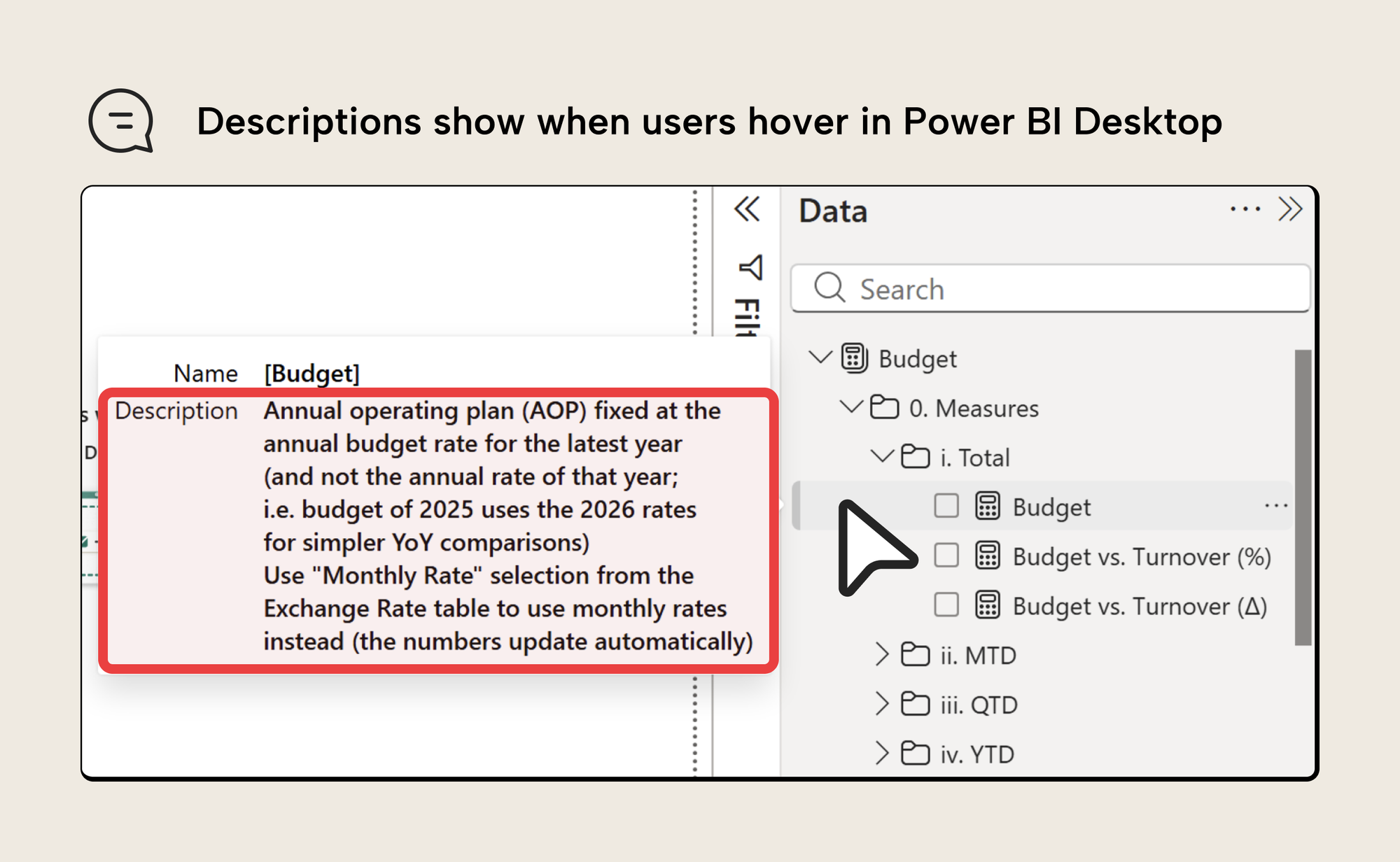
The previous screenshot shows an example of how descriptions can be helpful for users, providing useful information and context about a measure.
What goes in a description?
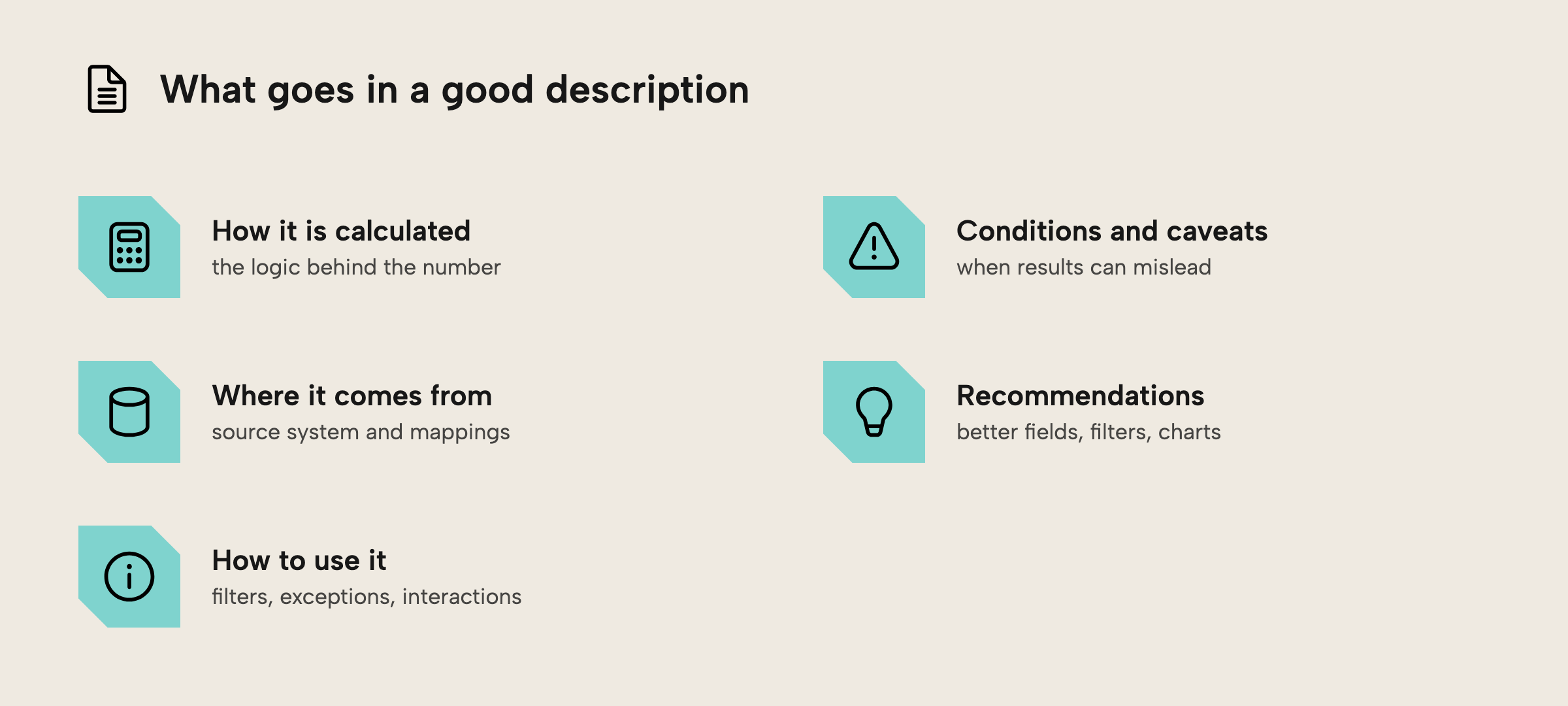
Descriptions should provide information about the field, such as:
- How it is calculated.
- Where the field comes from (i.e. source system data mappings) if it is relevant for users to know.
- Implicit information pertaining to how the field should be used in reports and queries.
- Instructions about how to use the field in the model, particularly when there are conditions, exceptions, or unexpected filters and interactions in the calculation.
- Where to find other relevant calculations, or clarifications about nomenclature.
- Recommendations for fields (to aggregate, or alternative measures), filters, chart types, and analyses.
This is particularly valuable when the measure involves metrics that are contentious or ambiguous in the organization across teams, departments, and regions. Budgets, forecasts, and margins are common examples of this (from our consulting experience). It’s also helpful for master data, like dimensions such as customer, product, and vendor hierarchies.
What doesn’t go in a description
Descriptions should not provide obvious or unrelated information:
- Meaningless information, like describing the Sales measure as the “Total sum of sales”, or describing Sales YTD as “The sales aggregated year-to-date”. It might be more interesting to know whether there are certain fields, dynamic currency conversion, or a specific aggregation logic applied.
- Verbose descriptions of fields, technical functions, or model structures that users don’t know or understand. Examples might be calling Orders as “The sum of net order quantity multiplied by net order price with USERELATIONSHIP to fields from the Date table.” This is much less helpful than saying “Order intake phased by the Sales Order Line Creation Date rather than the document header date. Uses the price at order creation.”
- DAX expressions, which are too complex, redundant, and not formatted properly in a description.
In summary, descriptions should make any implicit or hidden information explicit that would be useful or actionable when using that field. It could thus be clarifying and informative, or it could specify an action that someone must take to use that field correctly or effectively.
NOTE
In some cases, users might want to see the DAX expressions of a model that they are using to build reports, particularly with composite models. In this case, it might make sense to use descriptions to expose the expression. For instance, you can use a C# script in Tabular Editor or Python code in a Fabric notebook to sync these fields. Alternatively, this information can be obtained with the new INFO functions. However, the caveat is that adding (and maintaining) descriptions takes a lot of time. Before AI, it was very rare to see populated and helpful descriptions.
You can set descriptions one-by-one in the Properties pane, but a script is far quicker when you want to apply or sync them in bulk. For example, this Tabular Editor C# script stamps a description onto every measure that doesn’t already have one:
foreach (var m in Model.AllMeasures)
{
    if (string.IsNullOrWhiteSpace(m.Description))
        m.Description = "TODO: explain what this measure means and how to use it";
}
Don’t rely on AI to generate descriptions
Nowadays, it’s quite common for people to use AI to generate descriptions for fields in their model. This is possible in a variety of ways, including Copilot, notebooks, C# scripts, and coding agents working with MCP servers or directly on TMDL files. However, the descriptions arising from AI might seem useful and better than nothing, but they can be problematic:
- If they only use the model as context, then they miss important and relevant information that should go in that description. This is typically implicit information about how the field relates to the business process that your semantic model pertains to (an example is in the note block, below).
- AI is often verbose, producing text that gives a high cognitive load to read and understand. This also leads to higher per-token costs when you use AI for analysis or development due to bloated model and property definitions.
- Descriptions are often unhelpful or sometimes even incorrect (either subtly so or outright).
It’s undeniable that using AI can be helpful and convenient to populate descriptions. Thus, you can always use this approach but then review and update the descriptions to make sure that they are concise and useful. Just make sure you always read the things AI generates before you toss them into production or put them in front of users.
Now, with regards to agentic development, AI-generated descriptions are especially useless. In these cases, the description is likely just adding extra words and tokens; the AI can already see the same information summarized in the description from other model metadata. Here you should instead rely on skills, documentation, and other forms of AI context, which we’ll cover in later articles in a coming series and training about agentic development.
NOTE
To give a concrete example, consider a model that has a measure Sales & Shipped to report revenue. The measure could contain a specific calculation and the model metadata could make it clear that it phases revenue by shipment date instead of billing date. However, nothing in the model metadata says why that is the case. Talking to a business user in the sales community would reveal that the reason is because many stores bill at the end of the month, meaning that a disproportionately high volume of revenue ends up in the last few workdays. This isn’t representative of real intra-month performance, so the business recognizes revenue by shipment date, instead. Once the month is closed by finance, all past months are recognized by the proper billing date. Therefore, if a month is in progress, a query should use Sales & Shipped, but if the month is in the past and closed, then it should use Gross Sales.
A description on one or both of these measures could clarify this in brief, both for users and agents. The clarification would produce query results that better reflect the business process and user expectations. Importantly, though, this is an example of implicit information made explicit in context.
TIP
You can get better results with AI-generated descriptions if you integrate the agent with Fabric IQ or organizational context, such as other systems and documentation.
A good description for AI is different than one for users
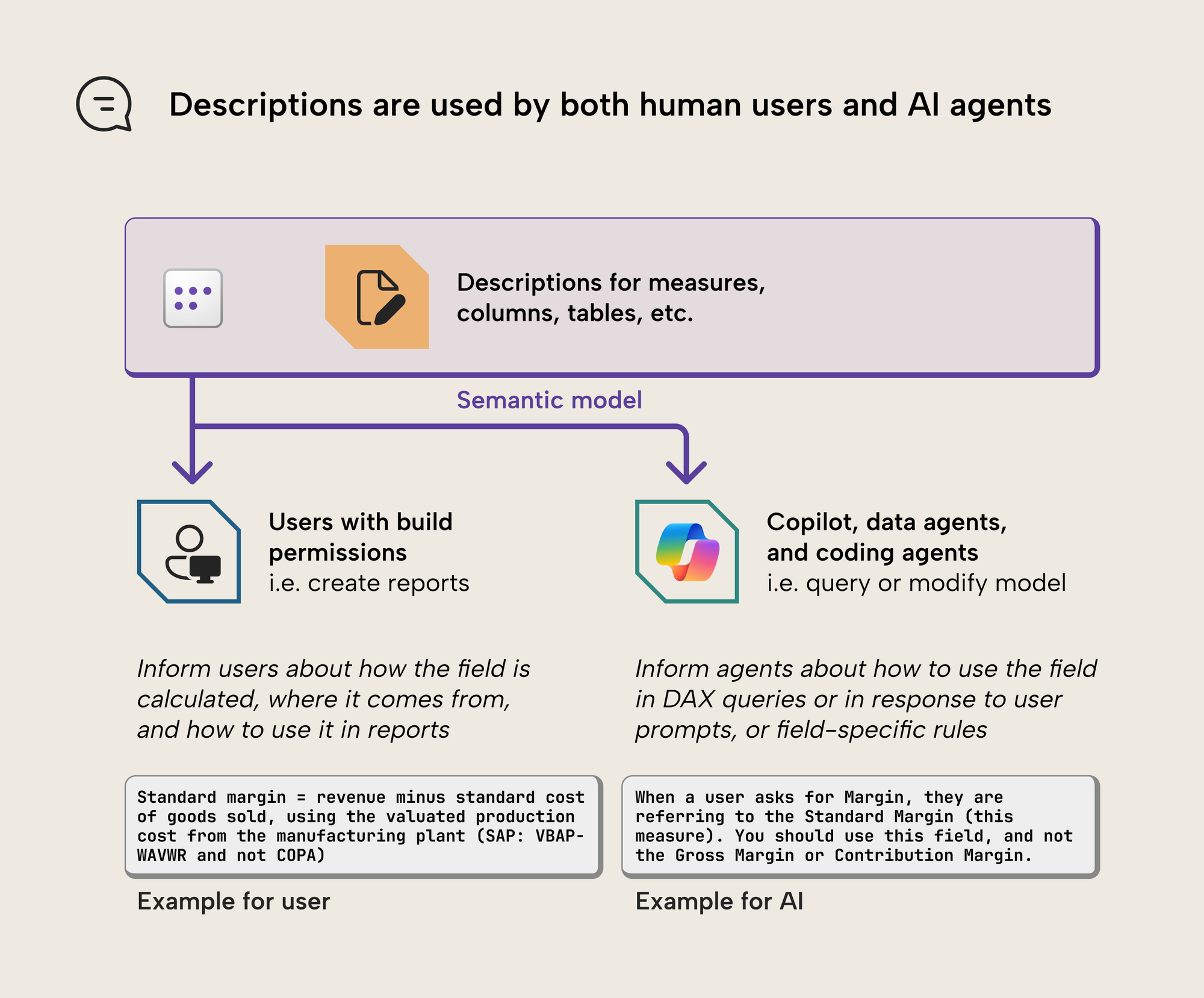
Descriptions are especially important for AI. Conversational BI tools like Copilot or data agents use descriptions for queries, and coding agents use them to manage or change the model via other tools. These descriptions become part of the context that the agent uses to “understand” the model and improve its outputs and actions, together with other information like field names and metadata. Bad or unclear descriptions can also lead to worse agent outputs, as we mentioned, above.
However, even if agents could write good descriptions with complete context, there’s a more nuanced issue, here. Specifically, a description that’s good for an agent looks very different than a description for a user or developer. Consider the following examples for descriptions of a measure, Standard Margin:
Descriptions for AI and agents
The following is an example of a description that’s intended for an agent:
“When a user asks for Margin, they are referring to the Standard Margin (this measure). You should use this field, and not the Gross Margin or Contribution Margin.”
The purpose of this description is to ensure that, i.e., Copilot takes this field if a user asks "What is the margin" or similar. It's an emphasis in addition to a synonym. But a human user or developer doesn't benefit from seeing this; they're just colloquially referring to it as "margin"; they can see from the measure name that it's "standard margin". If they see this, they assume this is a field for AI, so if there's relevant information for them, they might stop reading and not see it.
Descriptions for humans
Now, contrast this with an example of a description that’s intended for a human user:
“Standard margin = revenue minus standard cost of goods sold, using the valuated production cost from the manufacturing plant (SAP: VBAP-WAVWR and not COPA).”
The purpose of this description is to help a human user understand how "Standard Margin" is calculated, because it's a contentious metric in the large organization and everyone's arguing about it all the damn time. The description makes it unambiguous and even refers to the SAP source data fields. This information isn't relevant for Copilot to generate DAX queries; maybe it even confuses it. It might be useful for Copilot to answer the question "how is standard margin calculated", though.
Alternatives to descriptions for AI and agents
When you need to provide explicit information to AI and agents, consider using other properties and mediums, which aren’t exposed to users and are specifically designed for use by technical processes, pipelines, or AI:
- AI instructions, which are model-scoped, but let you provide freeform context like a markdown or text document. AI instructions aren’t automatically read by coding agents and in earlier PBIP schemas are stored in the linguistic metadata of TOM cultures.
- Code comments, which can also be specific to certain parts of the expression. This only works with AI in Fabric when you enable AI settings to allow Copilot to view DAX expressions and index your data.
- Annotations, which you can set in Tabular Editor, or in TMDL metadata (i.e. with an agent). Annotations are a bit more complex, though, and are only guaranteed to work with third-party agents (it’s unclear if they work with Copilot and Fabric data agents).
NOTE
You can also use the Fabric ontology to store information about data fields and their relationships, as well as other semantic information. At present, the ontology has limited support for freeform context, but this might be a welcome addition in the future to store data and process context with separate concerns from actual data and reporting artifacts…
Treat metadata and context as a first-class citizen
A recent article from Anthropic emphasized the importance of prioritizing your metadata and context. In semantic models, this includes naming conventions, descriptions, AI instructions, and so on. In the past, we used to neglect these elements as optional hygienic documentation. Now, it’s something that helps us scale to get better results from AI both with analytics and agentic development.
For further reading
- Use Copilot to create measure descriptions (Microsoft Learn). The official how-to for generating descriptions with Copilot, useful to know exactly what the AI starts from (your DAX) and therefore what it can’t know without your help.
- Extract measures and metadata from Power BI semantic models using DAX (Max Wikström). A practical look at the INFO functions for pulling descriptions and other metadata out of a model, handy for auditing which objects still need one.
- Naming conventions for Power BI semantic models (Tabular Editor). Naming and descriptions are the two halves of documenting a model; clear names mean you need fewer descriptions in the first place.
- How to write good AI instructions for a semantic model (Tabular Editor). The model-scoped counterpart to field-scoped descriptions, for context you want to give an agent that isn’t about one specific field.
In conclusion
Descriptions are freeform text fields useful for developer documentation and instructions for both human users and AI agents. Good descriptions can help people and AI use your model. A good description should make any implicit, non-obvious information about that field explicit, and doesn’t just summarize obvious information already in the name or table and display folder. And since the same description rarely serves a human and an agent equally well, be deliberate about who you’re writing each one for.
Use Tabular Editor 3 and the CLI to write descriptions for your semantic models.
Give Tabular Editor a spin