
Key takeaways
- LLMs can speed up model translation, not replace you: A short C# script sends your measure names to Anthropic's Claude and writes the results straight into your model's translation cultures.
- It builds on work from Darren Gosbell and Erik Svensen: The same ChatGPT-plus-Tabular-Editor pattern they used for descriptions, pointed at translating measure names instead.
- Save it as a macro for reuse: Drop the script into a macro (backslashes make folders) and run it from any model's right-click menu.
- Mind what you send: Your measure names go to a third party, so don't run it on anything confidential, and check Anthropic's terms first.
This summary is produced by the author, and not by AI.
Introduction
There is a lot of hype these days about Large Language Models. While they are excellent for some tasks, they still can’t replace a good BI developer.
However – they can be used for a lot of helpful things, so heavily inspired by the great articles written by Darren Gosbell: Automatically generating measure descriptions… & Generating Measure descriptions with ChatGPT – part 2 and the follow up by Erik Svensen: Document your #PowerBI model with #ChatGPT…. I wanted to add my own flavor of how to put these AI features to work building better data models.
So here is my attempt to help you quickly translate your model to multiple languages. Initially just for the measures (and only the names of those, not descriptions and display folders), but the same approach could be used for all texts that can be translated in the model.
WARNING
By using the scripts in this blog post, you will be sending your measure names to a 3rd party (Anthropic). Do not use it if your measure names contain confidential information. Be sure to check Anthropic’s usage policies before using it with this script or the scripts in the posts that I link to.
NOTE
This post is from early 2023, when the script below called GPT-3 (text-davinci-003) through OpenAI’s old completions endpoint, a model OpenAI has since retired. The script has been updated to use Anthropic’s Claude through the Messages API with claude-haiku-4-5, a fast and inexpensive model. Any current Claude model works the same way, just change the model constant.
Preparing your model
To begin with, you should open up your model with Tabular Editor and create the desired languages under Translations
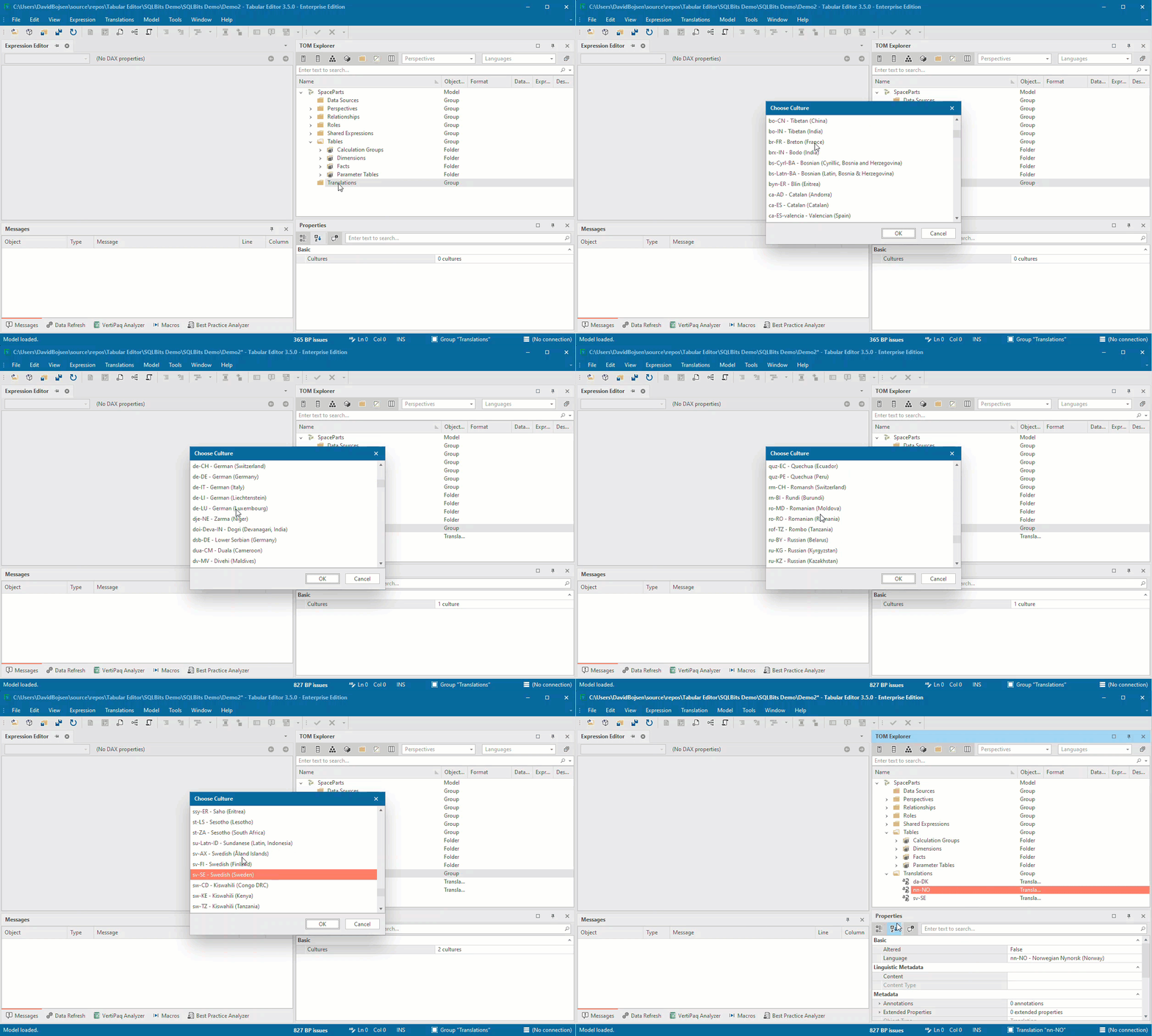
Next, you should open a new C# script and copy/paste this block of code in there:
#r "System.Net.Http"
using System.Net.Http;
using System.Text;
using Newtonsoft.Json.Linq;

// Sign in at https://console.anthropic.com/, create an API key, and paste it
// into the apiKey constant below.
const string apiKey = "<YOUR API KEY HERE>";
const string uri = "https://api.anthropic.com/v1/messages";
const string model = "claude-haiku-4-5"; // fast and cheap, plenty for short translations
const string question = "In the context of an analytical data model, translate the measure name \"{0}\" in the table \"{1}\" from English (en-US) to {2}. Reply with only the translated name, in short, precise business terms.";

bool dontOverwrite = true; // skip cultures that already have a translation

using (var client = new HttpClient()) {
    client.DefaultRequestHeaders.Clear();
    client.DefaultRequestHeaders.Add("x-api-key", apiKey);
    client.DefaultRequestHeaders.Add("anthropic-version", "2023-06-01");

    // Use the selected measures, or every measure in the model if none are selected.
    var myMeasures = new List<Measure>();
    myMeasures.AddRange(Selected.Measures);
    if (myMeasures.Count == 0)
        myMeasures.AddRange(Model.Tables.Where(t => t.Measures.Count() > 0).SelectMany(t => t.Measures));
    else
        dontOverwrite = false;

    foreach (var m in myMeasures) {
        foreach (var culture in Model.Cultures) {
            var cultureName = culture.Name;

            // Skip measures already translated for this culture (unless you selected them yourself).
            if (dontOverwrite && !string.IsNullOrEmpty(m.TranslatedNames[cultureName])) continue;

            var prompt = string.Format(question, m.Name, m.Table.Name, cultureName);
            var body =
                "{ \"model\": \"" + model + "\"" +
                ", \"max_tokens\": 256" +
                ", \"messages\": [ { \"role\": \"user\", \"content\": " + JsonConvert.SerializeObject(prompt) + " } ] }";

            var res = client.PostAsync(uri, new StringContent(body, Encoding.UTF8, "application/json"));
            res.Result.EnsureSuccessStatusCode();
            var result = res.Result.Content.ReadAsStringAsync().Result;
            var obj = JObject.Parse(result);
            var translated = obj["content"][0]["text"].ToString().Trim().Trim('"');

            m.TranslatedNames[cultureName] = translated;
        }
    }
}
If you haven’t already done so when playing with Darren's example, you now need to create your own Anthropic API key in the Anthropic console and paste it into the apiKey constant.
Now I suggest saving as a macro for easy reuse with any model you open – you can also just run it from the C# script editor.
TIP
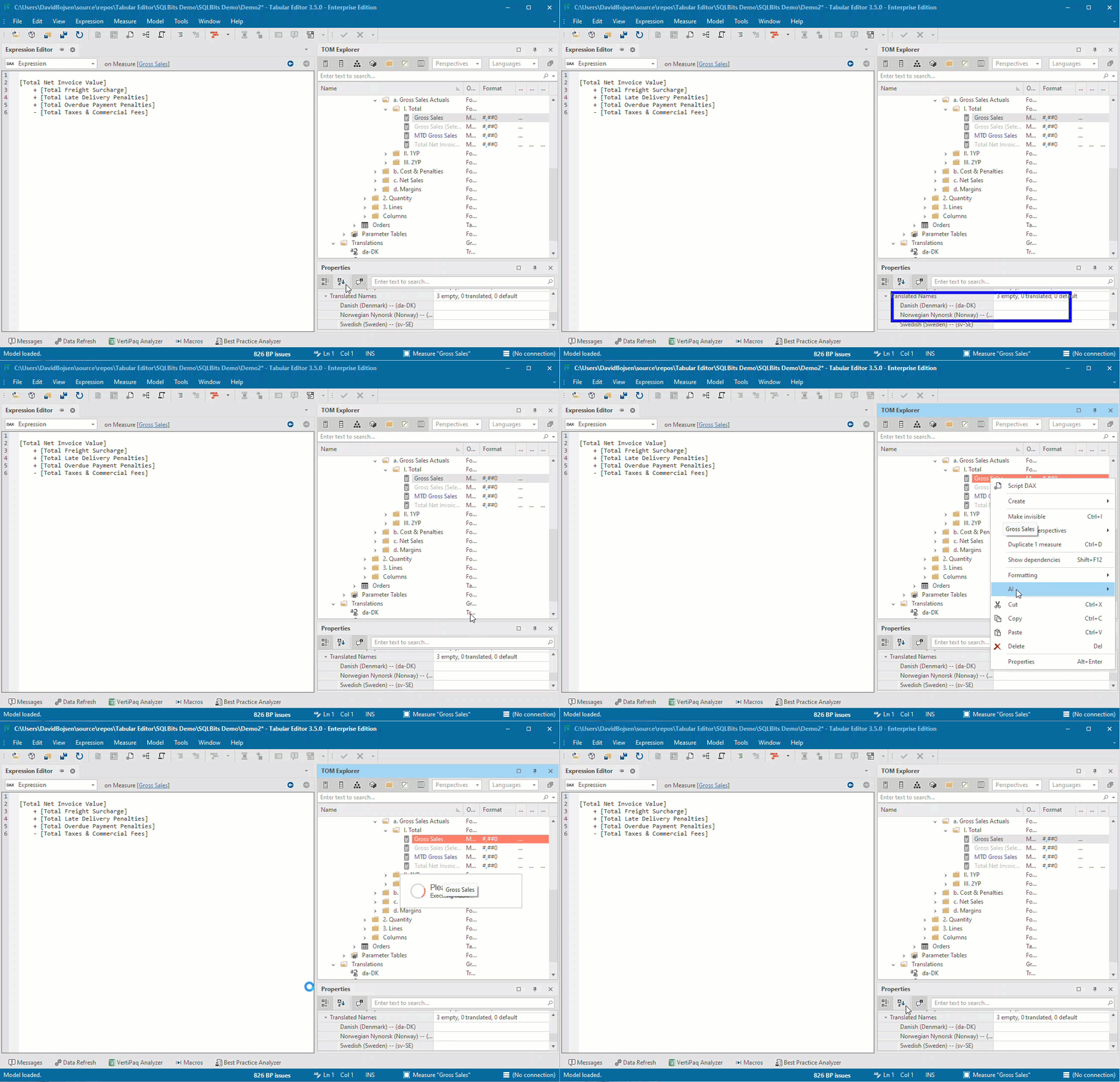
If you use a backslash in the macro name, you can build a folder hierarchy of macros. I called mine: AI\Translations\Translate measure using GPT3. More info about macros available in our documentation here.
Now all you need to do, is to right click your measure(s) and click AI -> Translations -> Translate measure using GPT3:
Thank you to Darren & Erik for sharing their thoughts. I hope you like this expansion to their great work.
For further reading
- Creating Multilingual Power BI Datasets (Tabular Editor). Covers the end-to-end workflow for building a multilingual model, into which these generated translations fit.
- Tabular Editor Tricks - Apply Default Translations (Tabular Editor). Covers a script that seeds default translations for every culture, a useful first pass before generating names with an LLM.
- Translations in tabular models (Microsoft Learn). How culture metadata and translated captions work under the hood, which is what the script writes into.
In conclusion
And that's it: a small script that hands your measure names to Claude (claude-haiku-4-5 here) and fills in the translations for every culture in your model. It's only measure names here, but the same approach works for descriptions, display folders, or any other translatable text. Thanks again to Darren and Erik for the groundwork, and I hope it saves you some typing.
Automate your model translations with Tabular Editor and an LLM.
Give Tabular Editor a spin