Key Takeaways
- The Tabular Editor CLI 0.7.0 is now available Limited Public Preview: This release focuses on safer defaults, a more consistent command syntax, and more consistency in showing model changes and reporting problems. The preview period has been extended from September 30 to October 31, 2026.
- Update existing scripts: Property assignments use
-p <Property>=<Value>, several commands move undergetorutil, and others are removed. The update checklist below maps the old commands to their replacements. - Review changes and read results consistently: Model edits show before/after values, and validation, BPA, tests, and queries share a JSON findings structure. Update scripts that read the CLI's JSON output.
- Run the same built-in BPA checks as in Desktop: The CLI now uses the same built-in rules, IDs, and severities as TE3 Desktop, so switching tools no longer changes which built-in checks run.
This summary is produced by the author, and not by AI.
Release overview
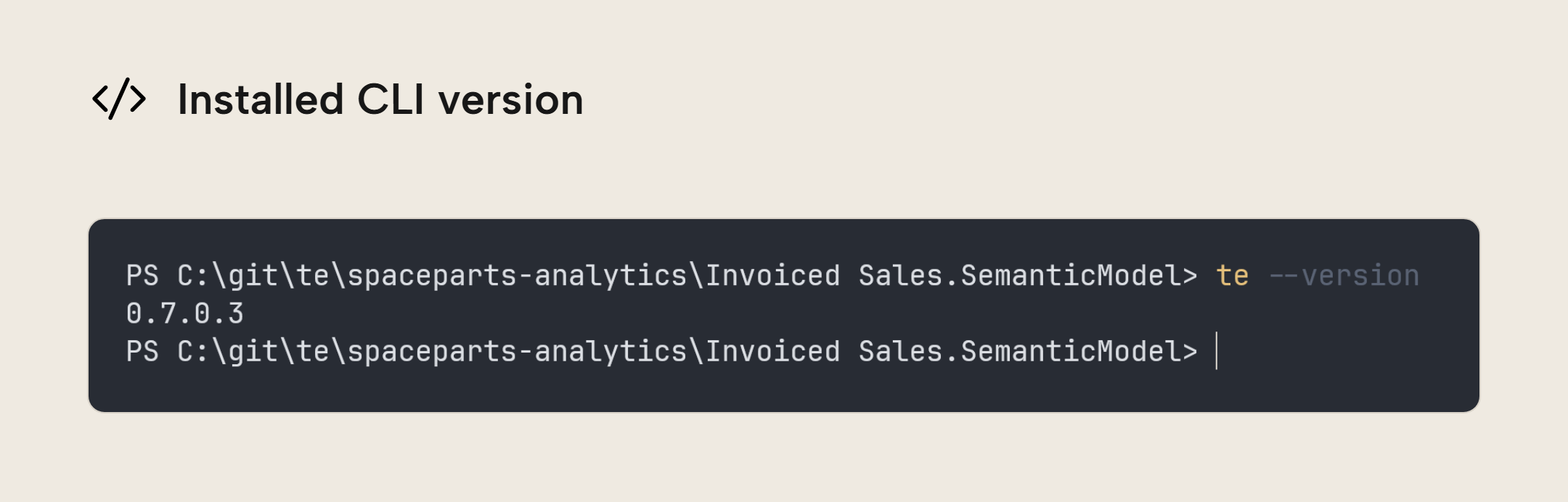
We're excited to share another release of the Tabular Editor CLI: 0.7.0. The Tabular Editor CLI lets you inspect, edit, validate, deploy, and refresh semantic models from your terminal, in CI/CD pipelines, and by agents. This release is about safer defaults for deployment and refresh, a more consistent command syntax, and consistent ways to show model changes and report problems.
NOTE
The TE CLI is in limited public preview and offered for evaluation with a Tabular Editor account. We recommend against using the CLI in production CI/CD pipelines during preview, as commands, flags, and outputs may change before general availability. The preview period has been extended from September 30 to October 31, 2026. This build will stop functioning after that date. After the preview period, a license will be required.
Safer by default
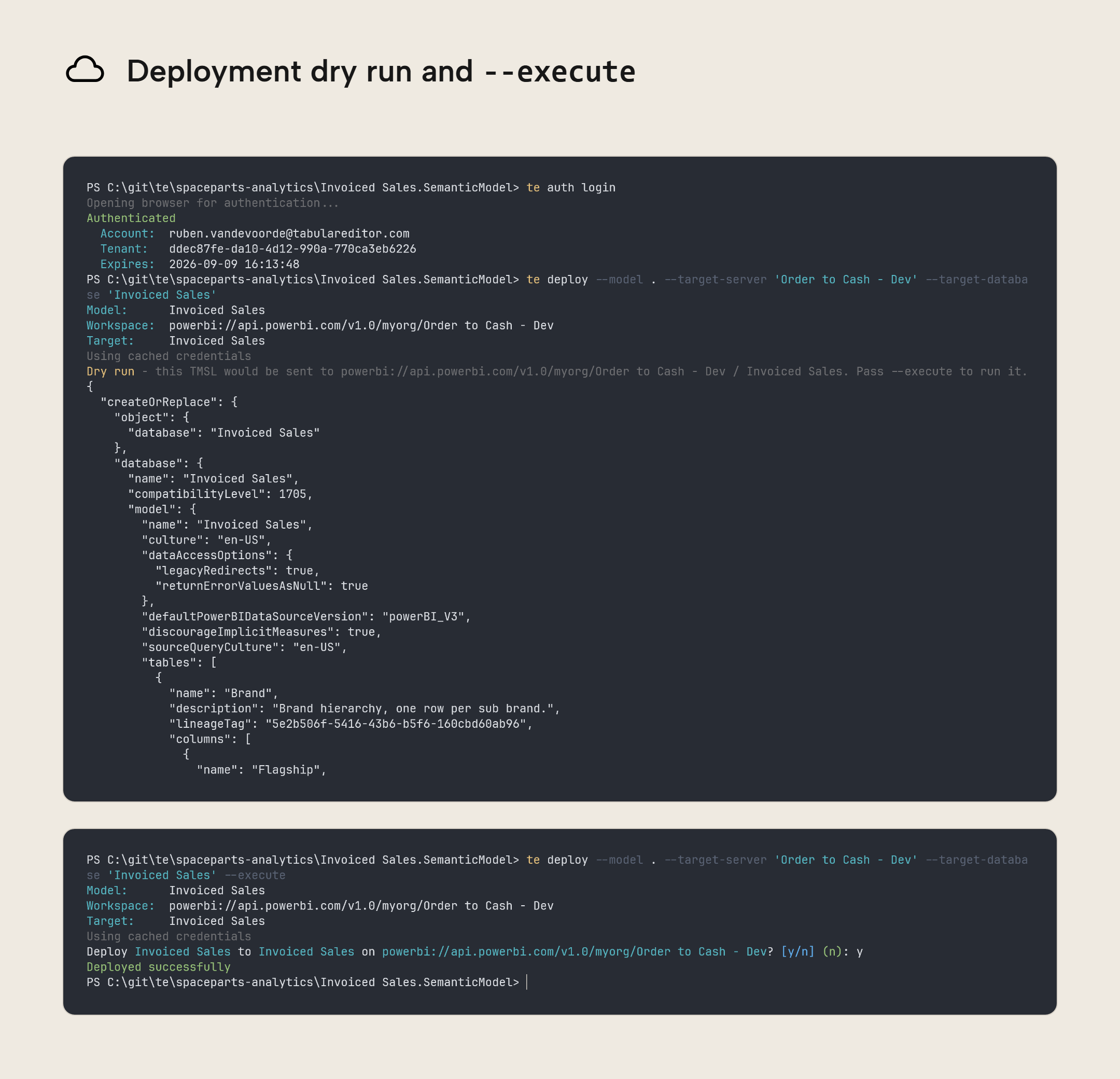
Defaults are the safety net you don't plan for; they help prevent small mistakes from having big consequences. That's why deploy and refresh now default to dry-run; you must pass --execute to actually make changes. These commands print the TMSL script that would run, so you can check what exactly will happen before changing a deployed model or starting a refresh. Add --execute to existing automation that should still deploy or refresh; otherwise, your pipeline will only preview the operation and leave the model unchanged.
You can now also deploy models published to the Power BI Service, and models running in Power BI Desktop, without first exporting them to disk.
- Use
--modelfor a local file or folder, or-s/-dfor a remote source. - Use
--target-serverand--target-databasefor the deployment target.
Simplified, consistent commands
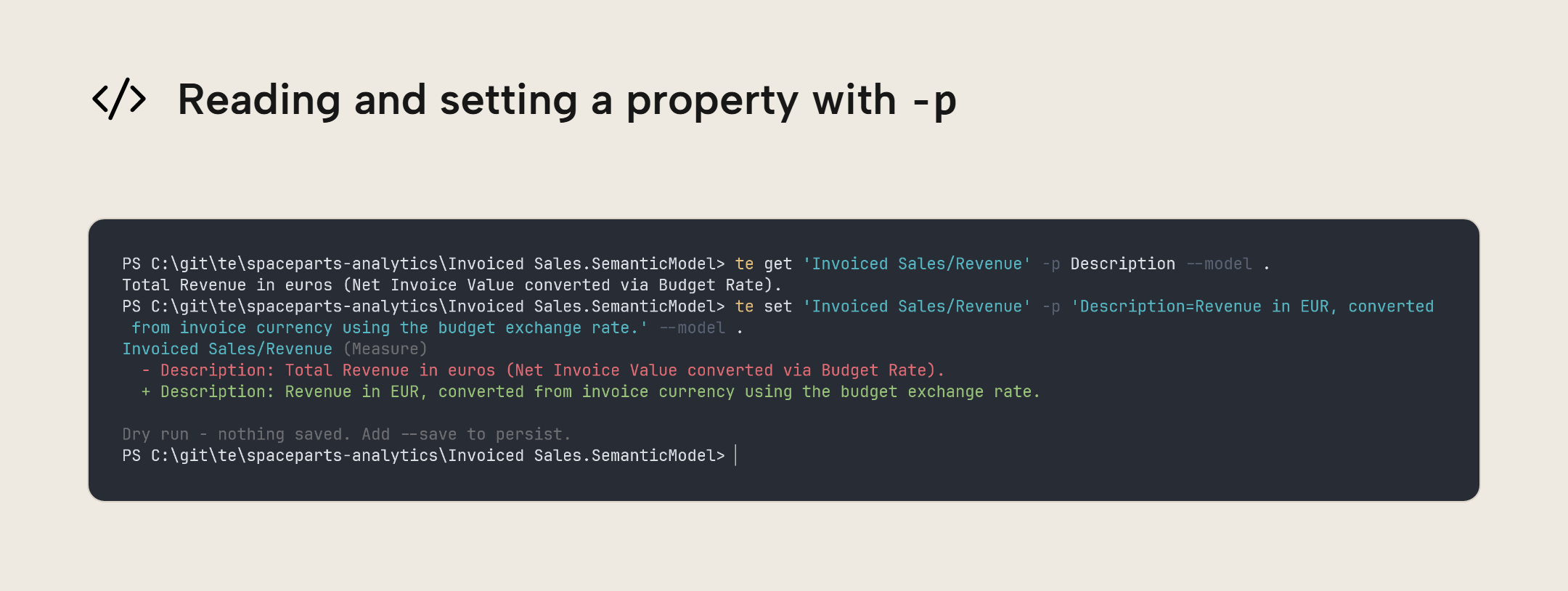
There's now one syntax to assign properties: -p <Property>=<Value>, for example te set 'Invoiced Sales/Revenue' -p IsHidden=False --model '<model path>' --save to unhide the Revenue measure. This syntax replaces the paired -q/-i property flags. To read a property, use te get 'Invoiced Sales/Revenue' -p Description --model '<model path>' to return the description of the Revenue object.
We consolidated several commands:
saveis being renamed tosave-as(saveis kept as an alias). In interactive mode,savecommits staged edits, whilesave-aswrites a model to another location or a different format.getbecomes the core command for listing and dependency inspection.ls/liststill work and become aliases ofget, as doesdeps. You can inspect properties, for example,te get 'Invoiced Sales/Revenue' -p Description --model '<model path>'to read the description of the Revenue object in the Invoiced Sales table. Filter objects, withte get Measures --where 'Name=*Revenue*' --model '<model path>'to return only the measures with Revenue in their name; list objects, for examplete get Hierarchies --model '<model path>'to list the all hierarchies in the model; and check dependencies, for examplete get 'Invoiced Sales/Revenue' --deps --model '<model path>'to see what Revenue depends on and what depends on Revenue. The original commands still work as shortcuts, so existing scripts can keep using them.formathas been removed. Formatting a model expression now happens withte set '<table>/<object>' --format Expression --model '<model path>' --save. DAX expressions and M scripts can be passed intote util format-dax '<DAX expression>'andte util format-m '<M expression>'for formatting.migratealso moves underutil, i.e.te util migrate.incremental-refreshhas been removed. You can inspect a table's policy withte get '<table>/RefreshPolicy' --model '<model path>', and configure it withte set '<table>/RefreshPolicy' -p '<Property>=<Value>' --model '<model path>' --save. Then apply a policy already saved on a deployed model withte refresh --apply-refresh-policy '<table>' -s '<workspace>' -d '<model>' --execute, which also loads data, whereas the oldapplyonly created partitions. To bootstrap empty partitions without loading data, runte script --inline 'Model.Tables["<table>"].ApplyRefreshPolicy();' -s '<workspace>' -d '<model>'.
More predictable output
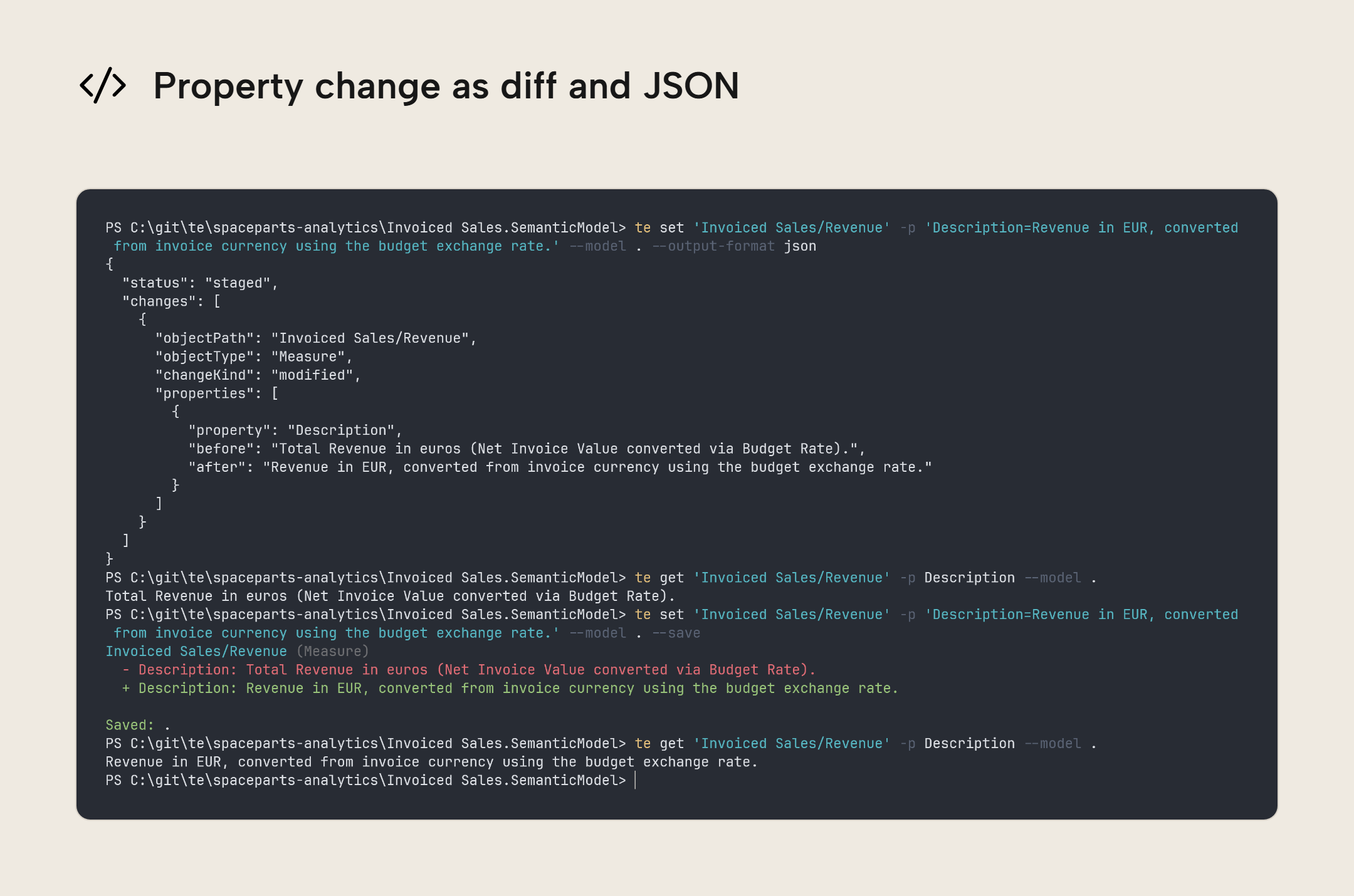
Commands that change a model, such as set, add, and remove, will now show the values before and after the change. Changing the Revenue description prints both the old description and the replacement, so you can review the actual edit. The same diff is shown whether you save the change or preview it, and the final status line tells you whether the change was saved, staged, or left unsaved.
diff now uses the same output format as these set, add, and remove editing commands. For structured output with --output-format json, the changes array contains one entry per changed object, with the changed properties and their before/after values grouped together. Previously, diff reported a separate entry for each property. Existigin scripts that read this output will need to account for the new structure and field names, including objectPath and changeKind.
Informational notices like which connection or model you're using now go to the stderr stream, keeping stdout for command results. When you pipe output into another command or save it to a file, meta information like connection notices and progress messages no longer get mixed in with the data. This also applies to text and CSV output.
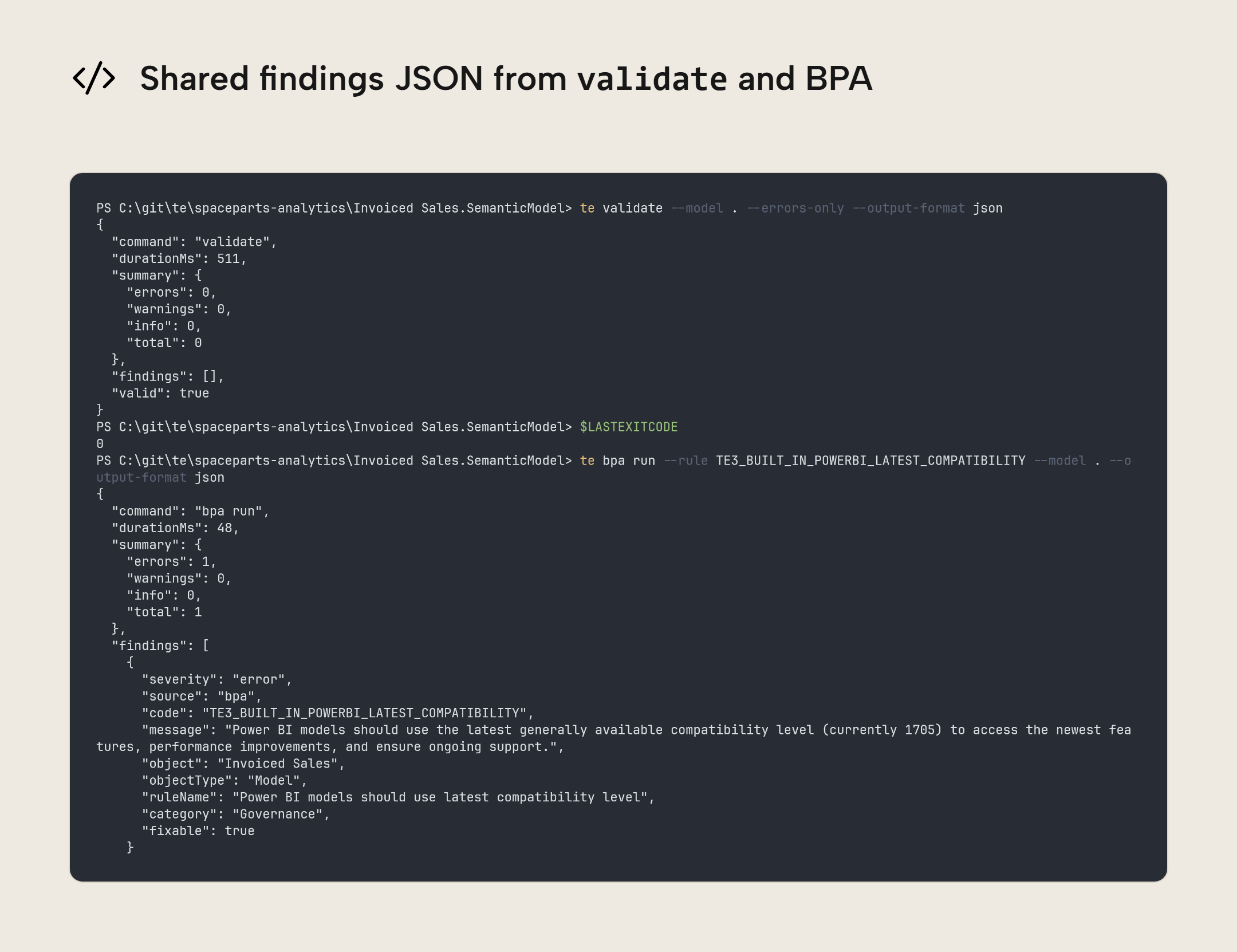
validate, bpa run, test run, and query now all report problems using the same JSON structure. Each output has a summary with error, warning, and information counts, and a findings array with the individual messages, codes, and severities. If the affected ojbect is known, findings also include an objectPath so you can pass it path to get to inspect it. You'll need to update scripts that read this JSON output, but a pipeline can then read findings from all four commands in the same way.
Checks and BPA
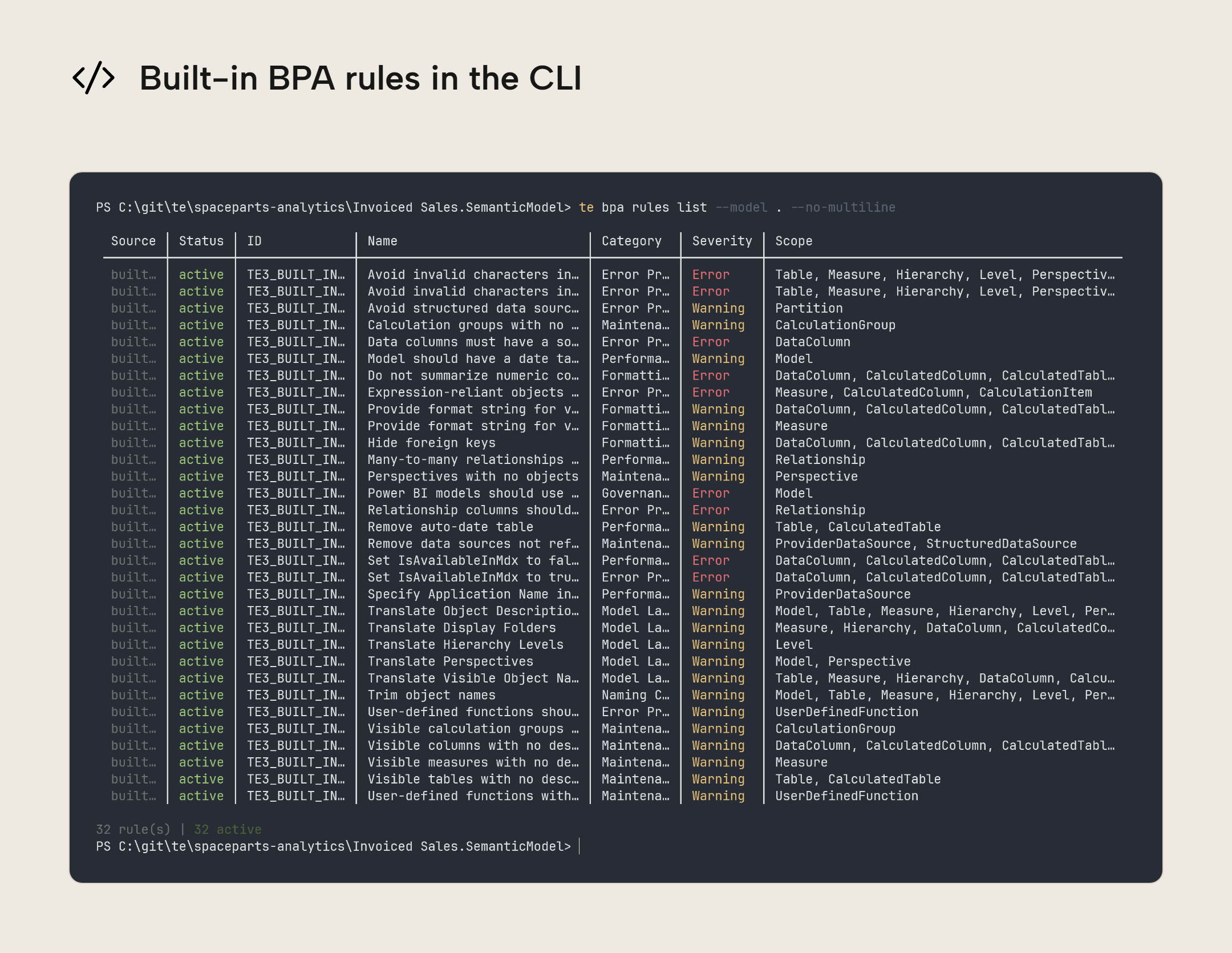
The CLI's BPA now uses the same built-in rules as TE3 Desktop, including the same IDs and severities. Switching between the two no longer changes which built-in checks run.
To align with TE3, the six VertiPaq rules (those with IDs starting with VPA_) are no longer included, and --vpa-rules has been removed. You can still run these checks if you supply the rules yourself:
- With
bpa run, point the CLI to the rules file with--rules, e.g.te bpa run --rules BPARules.json --model '<model path>'. - With
Bpa.Analyze()in a C# script, save the rules inside the semantic model. That scripting method doesn't read external rules files.
BPA now also returns a non-zero exit code when a rule cannot be evaluated. Previously, BPA could report success (a zero exit code) even though a rule had failed to run. Pipelines that check the exit code can now detect that rules couldn't be evaluated.
Source schema
You can now add a table from a data source already defined in the model, with te add '<table>' -t Table --source-table '<schema.table>' --model '<model path>' --save. The CLI will read the source table schema, and creates the table with a partition bound to the source (refresh is still a separate action). You don't need to specify connection details when the model uses one data source; if there are several, use te add '<table>' -t Table --source-table '<schema.table>' --data-source '<data source name>' --model '<model path>' --save to specify which source. This works for SQL Server, Azure SQL, and Fabric SQL sources.
For existing tables, you can now:
- Add a single data column without recreating the table, with
te add '<table>/<column>' -t DataColumn -p 'SourceColumn=<source column>' -p 'DataType=<type>' --model '<model path>' --save. - Add new source columns and update changed data types without losing existing column metadata, with
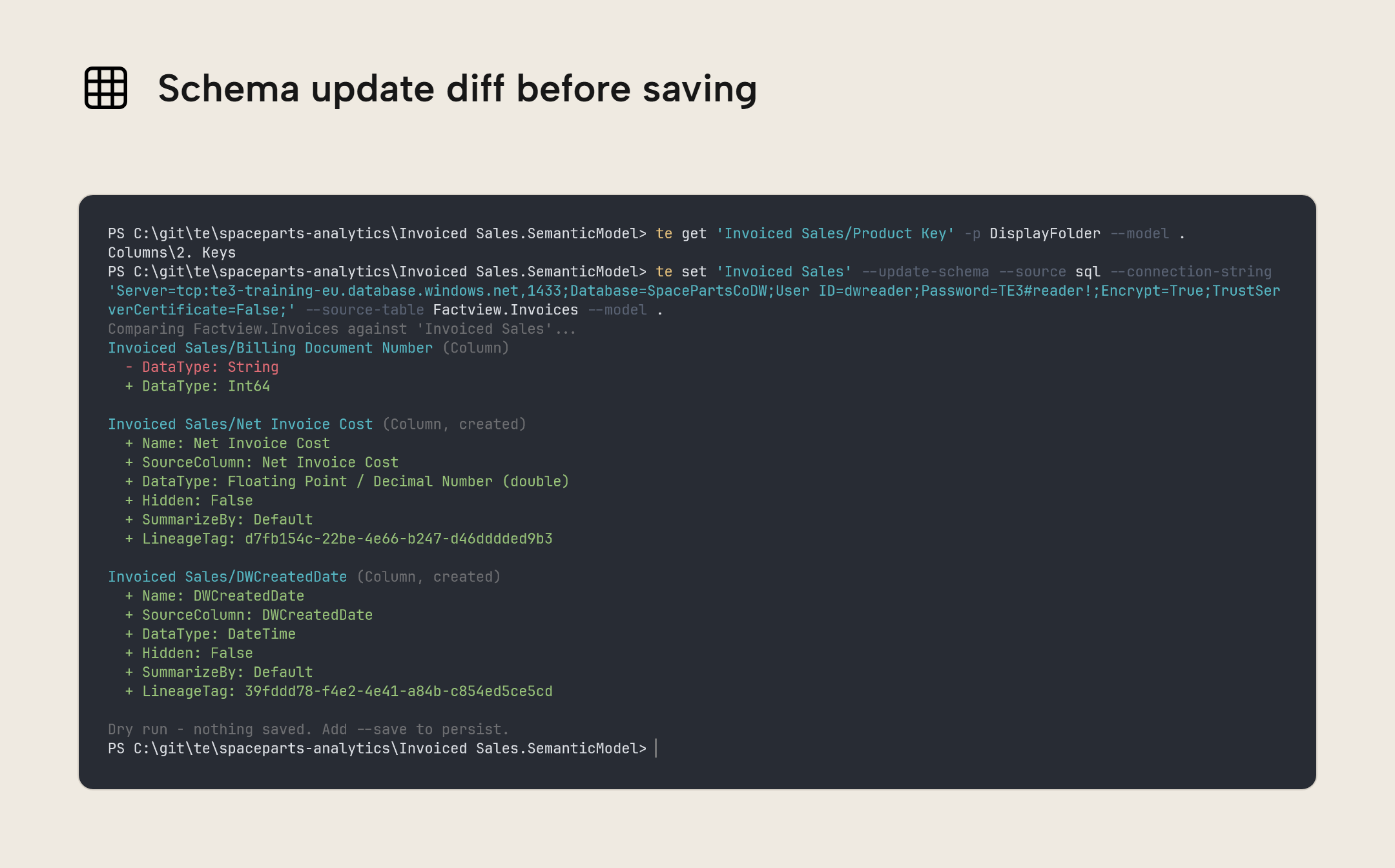
te set '<table>' --update-schema --source sql --endpoint '<source server>' --source-database '<source database>' --source-table '<schema.table>' --model '<model path>' --savefor a SQL source.
Columns that are in the semantic model but missing from the source flash a warning and are kept unless you pass --drop-removed-columns. A source-column rename is treated as a removal and an addition. To preserve the existing model column and DAX expressions that refer to it, update its binding with te set '<table>/<column>' -p 'SourceColumn=<new name>' --model '<model path>' --save.
Refresh and tracing
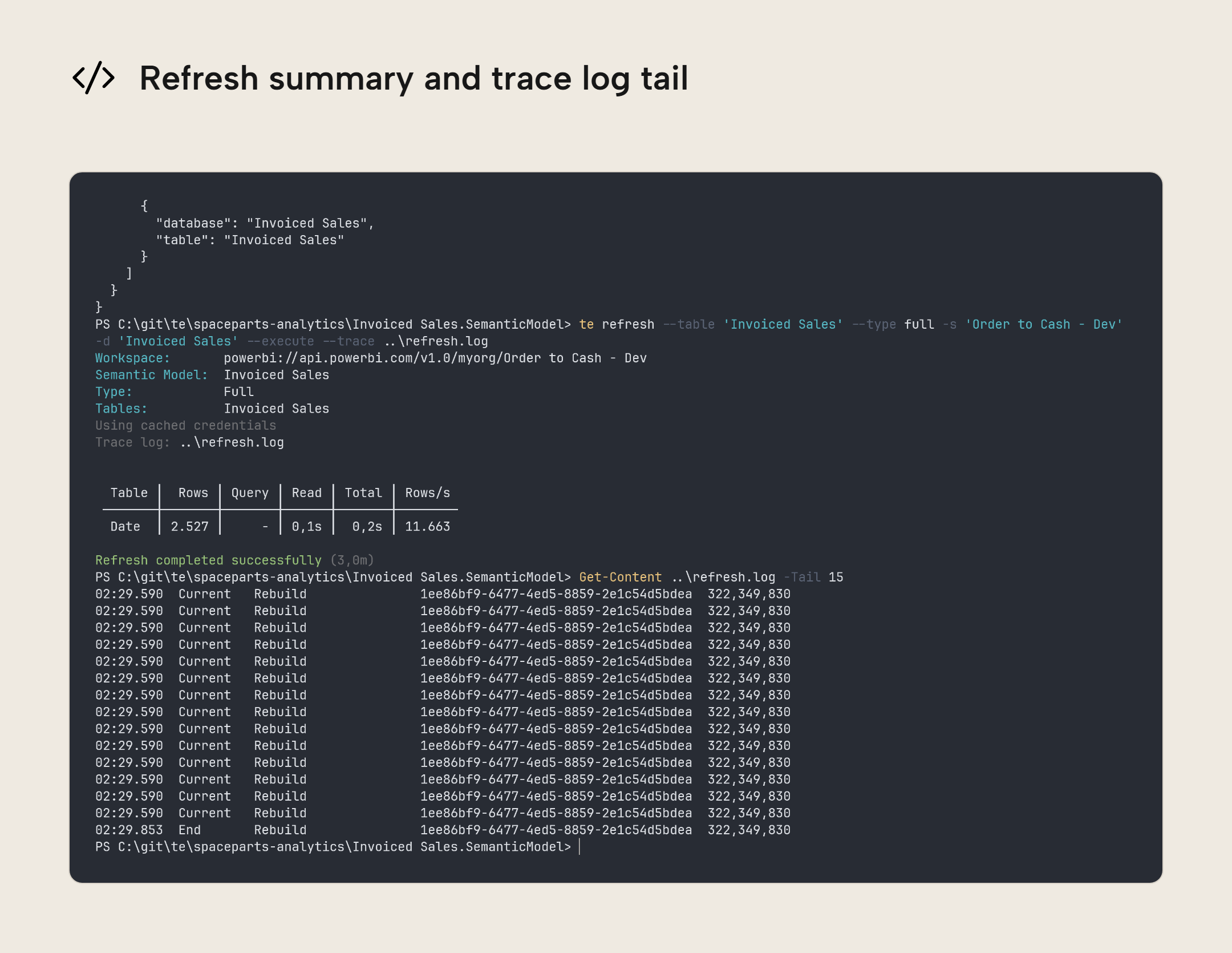
refresh --trace previously stopped collecting events as soon as the refresh command returned, even when the server still had events waiting to be delivered. Logs could therefore end mid-processing, without the events confirming that processing and the commit had finished. The CLI now waits briefly for those final events. Selecting a model with -d '<model ID>' also used to produce an empty log because the CLI did not recognise the model name in the incoming events. The CLI now matches both the model's name and its ID, so --trace can match either.
Refresh durations and throughput are now reported using the server's event timestamps when available. Previously, the CLI used the time each event arrived. Events delivered together could make a long operation appear to finish almost instantly, inflating the rows/second metric. Refresh output also reports measurements such as duration, throughput, CPU time, and memory use instead of subjective verdicts like "excellent" or "below typical".
Post-refresh VertiPaq statistics, such as each table's row count and size in bytes, are now included in JSON output when enabled by vertipaqOnRefresh. Previously, these statistics were only shown in text output. Automation can now read these values from the vertipaq array, so you can track model growth after a refresh.
Other fixes
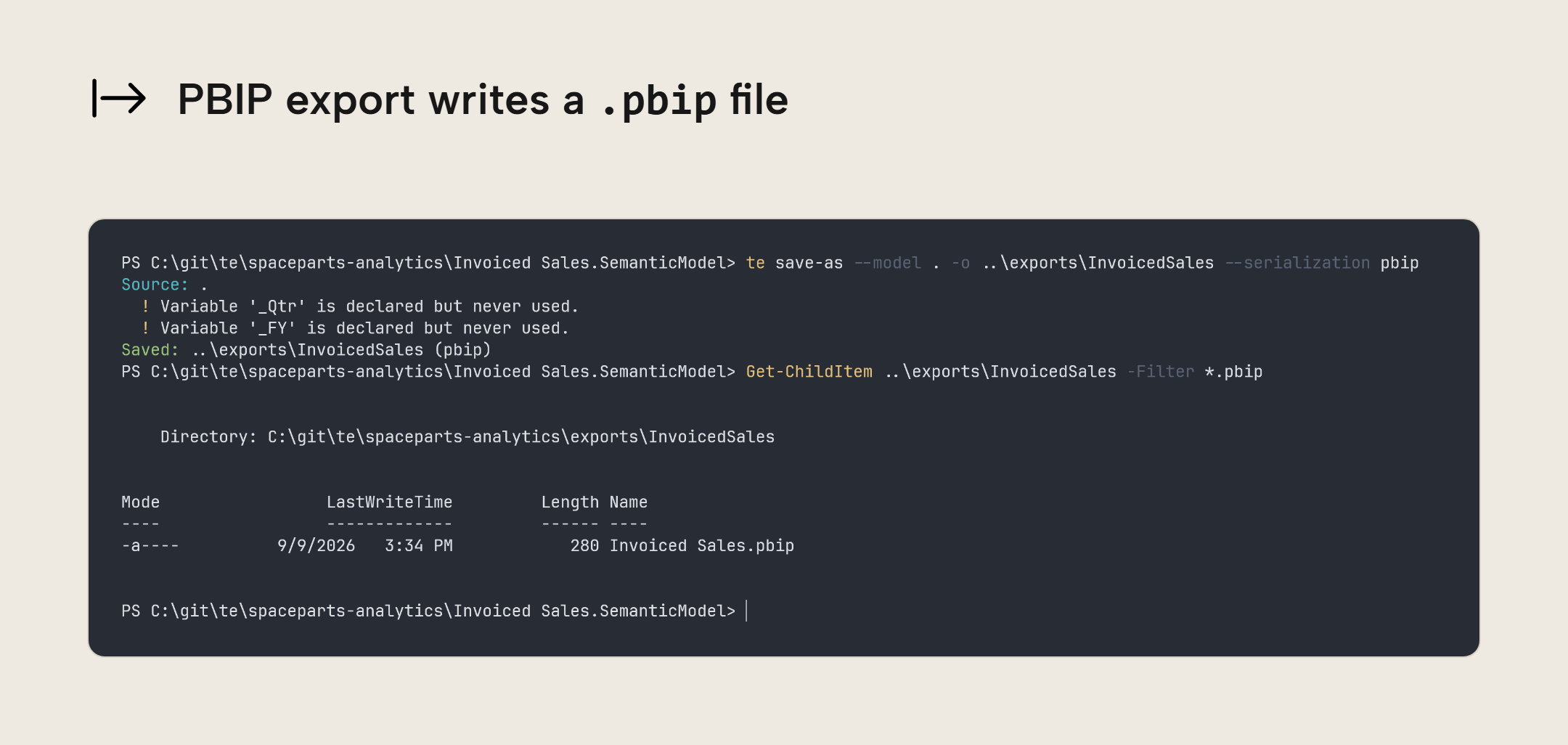
te save-as --model '<model path>' -o '<output folder>' --serialization pbipfixes invalid semantic model exports within Power BI projects (the.SemanticModelfolder), which previously prevented Power BI Desktop from opening the project.- Saving a model now produces consistent files across Windows, macOS, and Linux. Exports committed to Git on macOS and Linux can be cloned or checked out on Windows without invalid filenames. Table definitions are read from model folders in a consistent order, so saving them to a
.bimfile no longer rearranges the table list depending on the machine. Together with consistent line endings, this reduces file differences when the model itself has not changed. diffnow reports the correct object types and paths and detects changes in collections it previously missed, including partitions, hierarchies, and named expressions such as the shared Power Query parameters (e.g.RangeStartandRangeEnd). A CI/CD pipeline comparing models can now detect these changes instead of treating the models as identical. Checks that previously passed because a difference was missed may now fail and need review.- Hitting Ctrl-D on an empty prompt now exits interactive mode. Previously, the shortcut left the session open and you had to type
exitorquit. With--non-interactive, a command that needs input, such as choosing between multiple local databases, now reports an error instead of waiting for a response that could never come. A pipeline can detect the non-zero exit code and report a failed step instead of remaining stuck. - Names containing square brackets no longer crash progress spinners. A workspace or model name such as
Order to Cash [Dev]is now printed as written; previously, the terminal formatting code tried to interpret[Dev]as a color or style and failed. - Errors on the stderr stream retain their coloring when stdout is piped or redirected, so errors remain highlighted in the terminal while command results go elsewhere.
Update checklist
If you are upgrading from an earlier preview, check scripts for these changes. Removed flags and commands will fail; deployment and refresh need --execute to perform the operation:
| Usage | Before | In 0.7.0 |
|---|---|---|
| Read a property | te get '<table>/<object>' -q Description --model '<model path>' | te get '<table>/<object>' -p Description --model '<model path>' |
| Set a property | te set '<table>/<object>' -q Description -i '<description>' --model '<model path>' --save | te set '<table>/<object>' -p 'Description=<description>' --model '<model path>' --save |
| Select a local model | te get '<table>/<object>' '<model path>' | te get '<table>/<object>' --model '<model path>' |
| Deploy to a target | Deployment used -s / -d for the target and executed by default | te deploy --model '<model path>' --target-server '<workspace>' --target-database '<model>' --execute |
| Refresh a deployed model | Refresh executed by default | te refresh -s '<workspace>' -d '<model>' --execute |
| Save a deployment preview | Deployment script output used --xmla | te deploy --model '<model path>' --target-server '<workspace>' --target-database '<model>' > deploy.tmsl |
| Preview a refresh | Preview required --dry-run | te refresh -s '<workspace>' -d '<model>' |
| Save to a format or location | te save --model '<model path>' -o '<output folder>' --serialization tmdl | te save-as --model '<model path>' -o '<output folder>' --serialization tmdl; save remains an alias outside interactive mode |
| List objects | te ls --model '<model path>' | te get --model '<model path>'; ls and list remain shortcuts |
| Inspect dependencies | te deps '<table>/<object>' --model '<model path>' | te get '<table>/<object>' --deps --model '<model path>'; deps remains a shortcut |
| Format a model expression | te format --path '<table>/<object>' --model '<model path>' --save | te set '<table>/<object>' --format Expression --model '<model path>' --save |
| Format standalone DAX | te format -e '<DAX expression>' | te util format-dax '<DAX expression>' |
| Format standalone M | te format -e '<M expression>' --lang m | te util format-m '<M expression>' |
| Look up TE2 command equivalents | te migrate | te util migrate |
| Read a refresh policy | te incremental-refresh show '<table>' --model '<model path>' | te get '<table>/RefreshPolicy' --model '<model path>' |
| Change a refresh policy's rolling window | te incremental-refresh set '<table>' --rolling-window-periods 5 --model '<model path>' --save | te set '<table>/RefreshPolicy' -p RollingWindowPeriods=5 --model '<model path>' --save |
| Apply a saved policy and refresh | The old policy-application command created partitions only | te refresh --apply-refresh-policy '<table>' -s '<workspace>' -d '<model>' --execute |
| Create policy partitions without loading data | te incremental-refresh apply '<table>' -s '<workspace>' -d '<model>' | te script --inline 'Model.Tables["<table>"].ApplyRefreshPolicy();' -s '<workspace>' -d '<model>' |
| Run a script file and save edits | te script --script '<script.cs>' --model '<model path>' --save | te script --file '<script.cs>' --model '<model path>' --save |
| Run inline C# and save edits | te script -e '<C# code>' --model '<model path>' --save | te script --inline '<C# code>' --model '<model path>' --save |
| Compile a script without running it | te script --script '<script.cs>' --dry-run --model '<model path>' | te script --file '<script.cs>' --validate |
| Inspect a local model | te load --model '<model path>' | te get . --model '<model path>' |
| Inspect a deployed model | te load -s '<workspace>' -d '<model>' | te get . -s '<workspace>' -d '<model>' |
| Open the desktop application | The open command launched TE3 Desktop | TabularEditor3.exe |
| Replace text in model properties | The replace command performed bulk replacements | te script --file replace-descriptions.cs --model '<model path>' --save; the script is below |
| Read findings from JSON | Different structures across commands | te validate --model '<model path>' --output-format json returns summary and findings; BPA, tests, and queries use the same findings structure |
| Read changes from JSON | Command-specific output; diff had an entry per property | te diff '<before model path>' '<after model path>' --output-format json returns one entry per object in changes, with objectPath, changeKind, and a properties array |
| Run the six VertiPaq BPA rules | Bundled VPA_ rules and --vpa-rules | te bpa run --rules BPARules.json --model '<model path>'; for Bpa.Analyze(), store the rules in the model |
| Address names containing reserved characters | Unquoted names could be accepted | te get "Invoiced Sales/'Revenue?'" --model '<model path>' in PowerShell |
With deploy, -s and -d now select the source model. To copy between workspaces, use te deploy -s '<source workspace>' -d '<source model>' --target-server '<target workspace>' --target-database '<target model>' --execute.
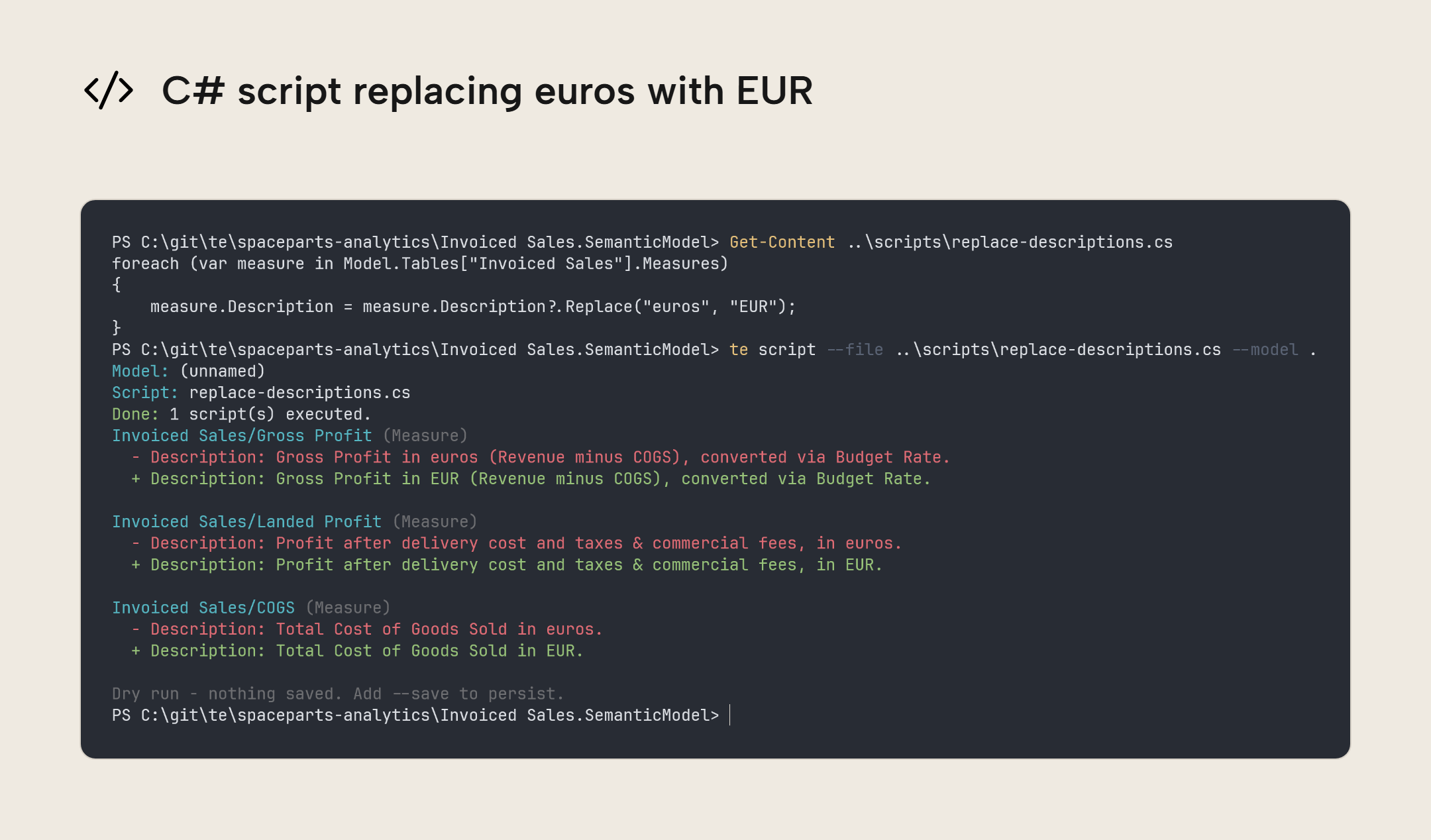
For bulk replacements previously done with replace, use a C# script that selects the objects and properties to change. For example, save this as replace-descriptions.cs to replace "euros" with "EUR" in the descriptions of measures in the Invoiced Sales table:
foreach (var measure in Model.Tables["Invoiced Sales"].Measures)
{
    measure.Description = measure.Description?.Replace("euros", "EUR");
}
Preview the description changes with te script --file replace-descriptions.cs --model '<model path>'. To save them, run te script --file replace-descriptions.cs --model '<model path>' --save. Both commands print a before/after diff of the changed descriptions.
The shared change format applies to diff, set, add, remove, move, script, and bpa run --fix. Update any scripts that read JSON output from these commands.
Object names containing {, }, *, or ? now need quotes around them when used as input. For a measure named Revenue? in the Invoiced Sales table, the PowerShell example is te get "Invoiced Sales/'Revenue?'" --model '<model path>'. The inner single quotes (') tell the CLI that ? is part of the measure's name. The outer double quotes (") keep the full path together when PowerShell passes it to the CLI. Update paths in scripts that address objects with these characters in their names.
Further Reading
- Release notes (Tabular Editor). The complete release notes.
- Built-in BPA Rules (Tabular Editor). Describes the built-in rules shared with TE3 Desktop and what each check looks for.
- Prevent timeouts on initial full refresh (Microsoft Learn). Explains how to create empty partitions for an incremental refresh policy, then load them in batches.
In conclusion
The main changes in 0.7.0 give you more visibility into what a command will change and make its results easier to read in automation. Before upgrading an existing pipeline, check which commands need replacing, add --execute where deployment or refresh should run, and update scripts for the new JSON formats.
Download the preview from the Tabular Editor CLI download page. The CLI documentation covers installation, authentication, and command usage.
Report bugs through GitHub issues, or share questions and feedback in GitHub discussions.
Take your semantic models further with Tabular Editor.
Give Tabular Editor a spin