Key takeaways
- Free DAX Optimizer access for Enterprise customers: The integration is now GA, and paid Enterprise Edition holders get 4 DAX Optimizer runs per day against a single model.
- Code Actions speed up DAX editing: You get 29 one-click suggestions across Improvements, Readability, and Rewrites, reachable anywhere with
Ctrl+.. - New Value Filter Behavior property: Control auto-exist on compatibility level 1606+ models, choosing Automatic, Independent, or Coalesced.
- Smaller wins: A new Entra MFA authentication option, configurable recent-items lists, and faster diagrams on very large models.
This summary is produced by the author, and not by AI.
Introduction
We are thrilled to share the news about the latest release of Tabular Editor 3, featuring two big new updates. The first was announced during the brilliant European FabCon in Stockholm, namely that our Enterprise Edition customers are eligible for free DAX Optimizer access, starting with this release. This also means that the DAX Optimizer Integration feature in Tabular Editor 3 is generally available. The second big update is called Code Actions. It’s a productivity feature designed to take your DAX code editing experience to the next level, turning common code refactoring and improvements into a one-click maneuver.
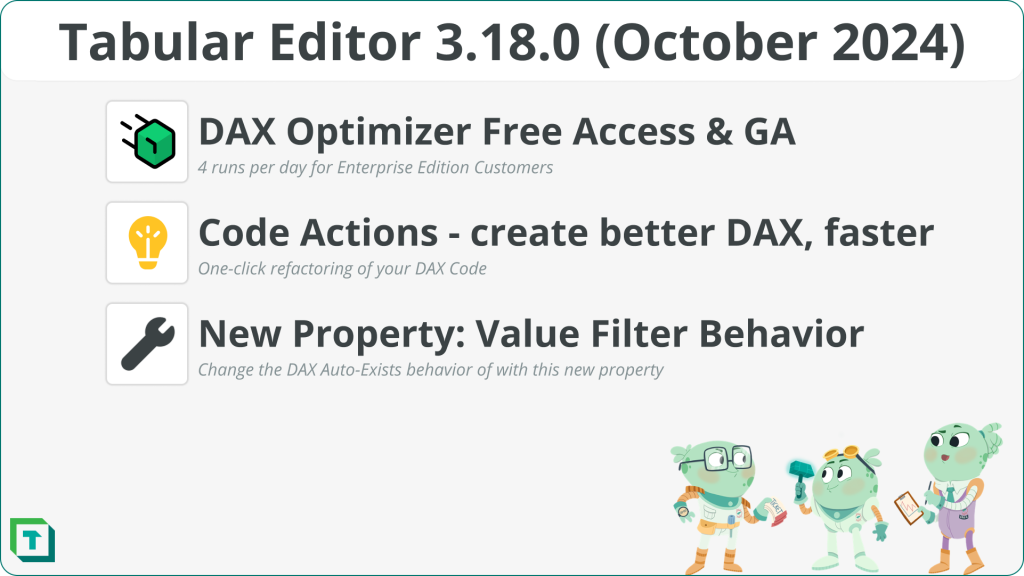
Figure: Highlighted features and improvements in the October 2024 release of Tabular Editor 3
Want to get your hands on the newest release? Head on over to our downloads page to get it!
New features
The big news this release is that DAX Optimizer is now generally available with free access.
DAX Optimizer GA with free access
Our official launch of the DAX Optimizer integration into Tabular Editor 3 also means we now offer our Enterprise Edition customers free access to DAX Optimizer through our partnership with Tabular Tools. So, if you are an Enterprise Edition license holder with a paid subscription, you can redeem 4 DAX Optimizer runs per day against a single model. All you need to do is register an account with Tabular Tools, retrieve your redemption code from within Tabular Editor 3, and then you can start optimizing your model! You can read all about how to do this in our accompanying blog dedicated to how you can redeem your license.
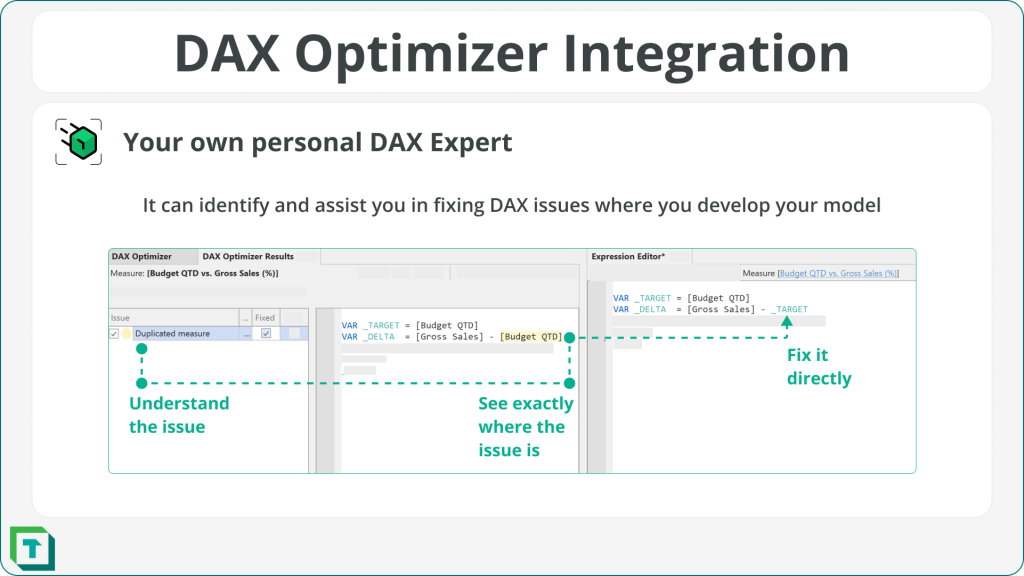
Having DAX Optimizer available is like having your own personal DAX expert (without the Italian accent) sit with you and go through your DAX line by line, suggesting improvements and ensuring optimal performance. And having DAX Optimizer inside Tabular Editor 3 allows you to understand your DAX issues, see where they occur, and fix them without leaving your development environment. We also ensured that using DAX Optimizer in Tabular Editor 3 is as secure as possible, which is why obfuscating your model when uploading it to the DAX Optimizer service is switched on by default!
The October 2024 release also ensures that all the newest features of DAX Optimizer are supported, such as the new evaluation metrics that were part of DAX Optimizer 1.2.
Code Actions
Ever needed a hand to ensure your DAX is well-written? Well, now you don’t have to remember all the best practices and readability advice, as Tabular Editor 3 Code Actions help you write better DAX faster.
Code Actions are part of all the DAX editors inside Tabular Editor 3 and discreetly provide one-click suggestions on improving your DAX. The current release has 29 different code actions available, divided into three distinct categories: Improvements, Readability, and Rewrites – and we plan to add more in future releases iteratively.
Below are some examples of how Code Actions work:
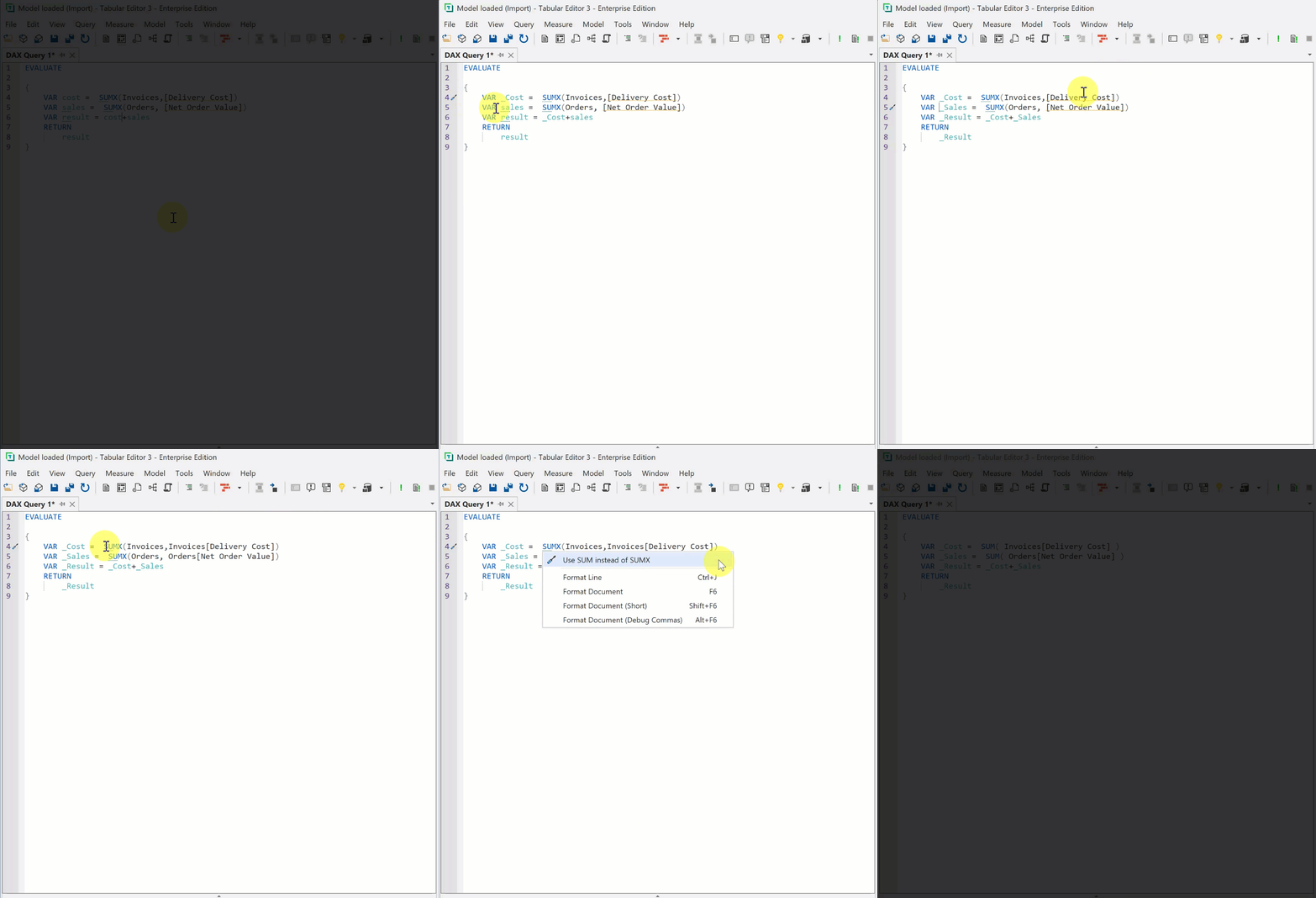
In the GIF, the available Code Actions are shown as a screwdriver or light bulb with squiggles underlining the code. The Code Action menu is available throughout the UI and can be accessed using the shortcut Ctrl+. The DAX code is then adjusted so the variables are prefixed with _underscore and the first letter capitalized. Additionally, table names are added to columns, and finally, the aggregator SUM is used instead of the SUMX iterator.
To get a list of all the Code Actions that Tabular Editor 3 provides, please refer to our documentation.
Opening model from DB: new authentication option
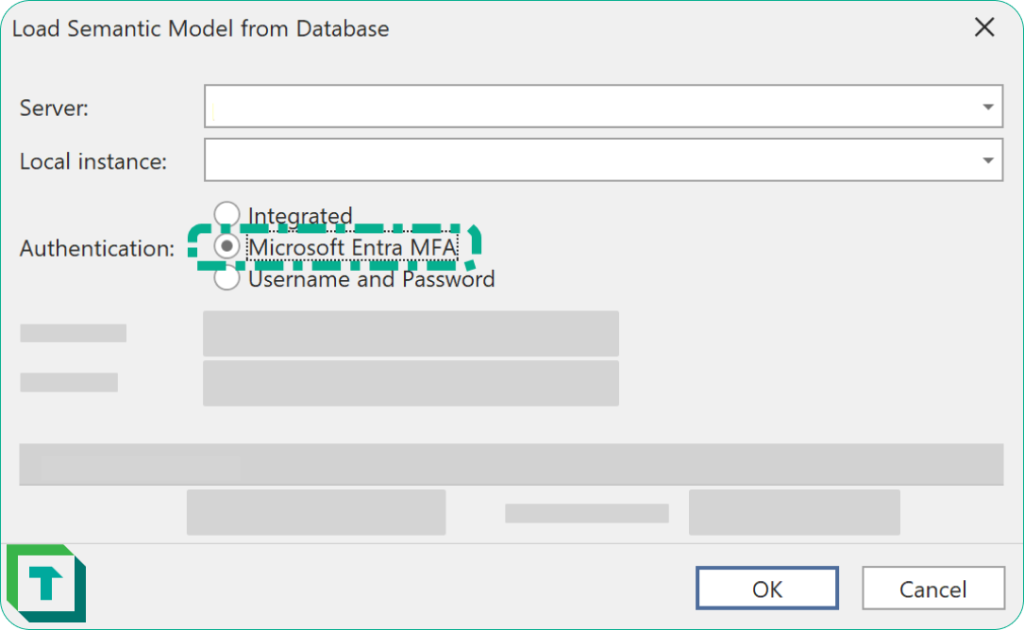
The October release uses the latest Analysis Services client library (AMO/TOM) from Microsoft. A behavior change in this library causes users to be signed in automatically when choosing the Integrated authentication option, if a Microsoft work or school account is associated with their Windows account. However, often when connecting to the Power BI XMLA endpoint, or Azure Analysis Services instances, you may want to choose a different account for signing in. In this case, choose the Microsoft Entra MFA authentication option, to ensure that you are prompted with the Microsoft Entra ID account selector.
Improvements
We’ve made several other improvements in the October 2024 release as well; here are our three highlights.
New model property: Value Filter Behavior
The latest Power BI/Fabric semantic model compatibility level includes a new property that controls the notorious auto-exist behavior, impacting how the SUMMARIZECOLUMNS function deals with multiple filters applied to the same table. This property is available on Power BI/Fabric models at compatibility level 1606 or higher.
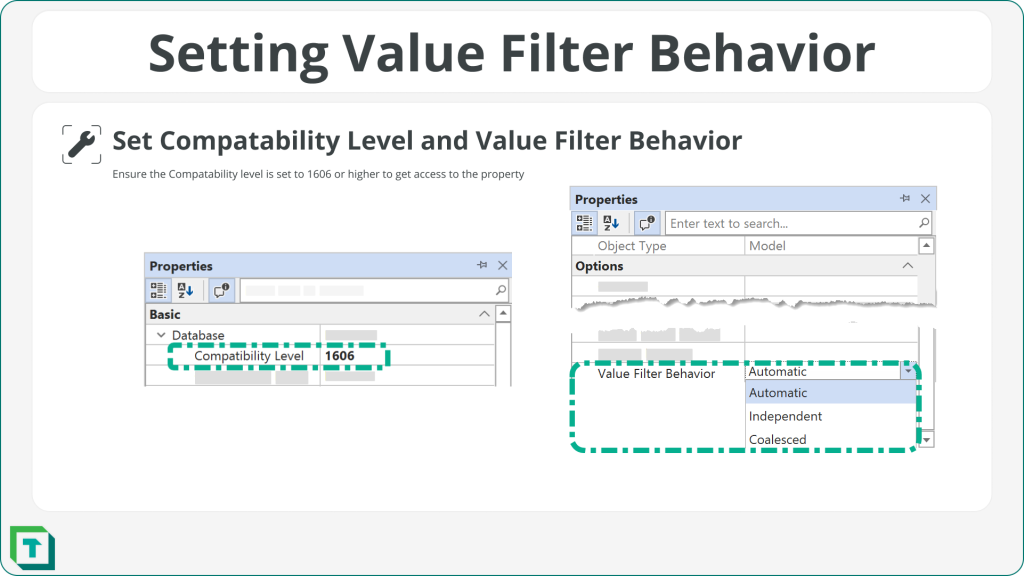
The Value Filter Behavior property has three different values that you can specify.
- Automatic: This is the default setting and it currently makes the Coalesced behavior kick in (in which multiple filters on a table are combined into a single filter based on actual values within the table, i.e. “auto-exist”).
- Independent: This ensures that filters on the same table are kept separate.
- Coalesced: This enforces the value filter behavior for the semantic model, combining the filters on the same table into one.
For more information on this property and its implications, please refer to Microsoft’s release blog post: Power BI October 2024 Feature Summary.
Recent Items preferences
Thank you, Ed Hansberry, for your suggestion on our GitHub forum. We’ve listened and added a new setting in the preferences pane based on your feedback. Now, users can easily customize the number of recent items displayed in the file menu and the recent server menu. As an extra bonus, users can also clear those lists whenever they wish. We highly value all the input we get from our users, so please keep them coming!
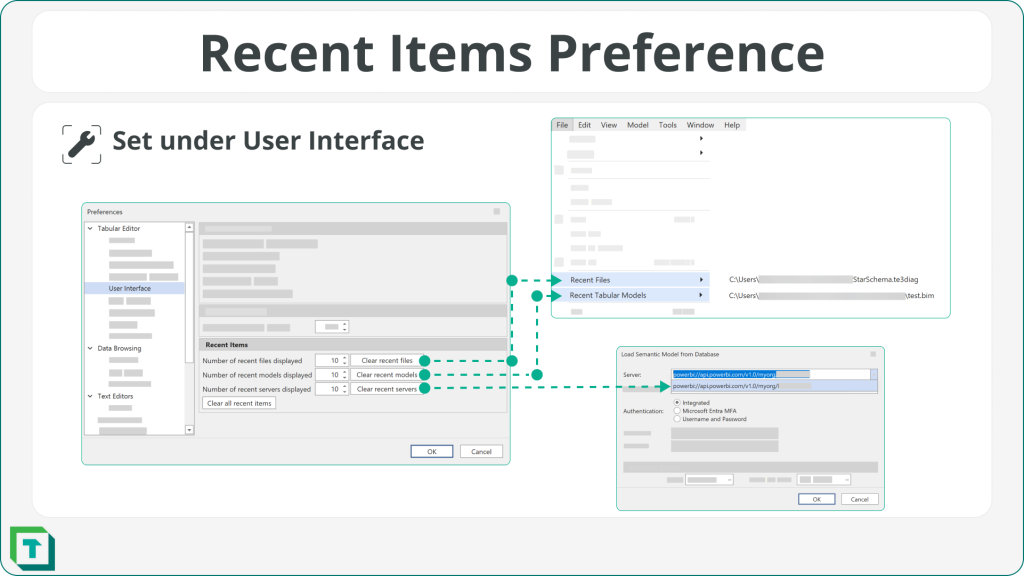
Diagram performance on large models
We have updated our diagram component to make it considerably faster on very large models, so you can continue to build that galaxy star schema you have always wanted.
Bug fixes
We have made multiple bug fixes in 3.18.0; please see our release notes for full details.
Better support for FormatString measures
We have fixed an issue where the semantic analyzer would show a warning due to the internal FormatString measures in DAX expressions, which also blocked the ability to debug DAX queries where such a measure was present. However, note that debugging the FormatString measure itself is still not possible.
If you have any feedback or experience any bugs, please reach out to us in our community forum. We look forward to hearing from you!
For further reading
- Quick-fix reference (Tabular Editor Docs). The feature reference for the Code Actions available inside DAX editors.
- Free DAX Optimizer Access in Tabular Editor 3 (Tabular Editor). How Enterprise customers redeem the daily DAX Optimizer runs introduced here.
- Filter behavior background (SQLBI). The DAX behavior behind the new Value Filter Behavior property.
- Semantic model connectivity with the XMLA endpoint (Microsoft Learn). The XMLA endpoint underpins the new authentication behavior in this release and is required for Premium-tier features like advanced incremental refresh.
In conclusion
That's the October 2024 release: DAX Optimizer goes GA with free runs for Enterprise customers, Code Actions turn DAX best practices into one-click fixes, and a new Value Filter Behavior property gives you control over auto-exist. Grab 3.18.0 from the downloads page, and as always, let us know in the forum what you'd like to see next.
Use Tabular Editor 3 to write DAX queries, inspect model metadata, and keep model work organized.
Give Tabular Editor a spin