Key takeaways
- New UI languages: Tabular Editor 3 is now available in five new languages: Spanish, Chinese, German, Japanese, and French.
- Built-in BPA rules: Best Practice rules are now included with the application, helping every developer align with vetted, authorized practices.
- Semantic Bridge for Databricks: Convert and consolidate Databricks metric views into Power BI semantic models, with a programmatic interface for scripting.
- Calendar Editor and more: A new Calendar Editor window manages custom calendars for DAX time intelligence, alongside saving with supporting Fabric files and an advanced refresh dialog.
This summary is produced by the author, and not by AI.
Version 3.25.0
We're very excited to bring several new features and improvements into Tabular Editor 3 with this release, which we summarize in the following sections.
Select your language
We are delighted to announce that Tabular Editor 3 is now available in five new languages:
- Spanish
- Chinese
- German (Beta)
- Japanese (Beta)
- French (Beta)
NOTE
Languages listed above have been proofread by a human and can be chosen when installing Tabular Editor 3. Languages marked as Beta have been translated by AI but haven't been proofread, and can only be selected in Tabular Editor 3. Our plan is to proofread beta languages over the next couple of releases.
Our criteria for a language going into GA are:
All relevant words and sentences are translated in the UI.
All translated text is proofread and corrected by a human fluent in that language.
Our documentation has been translated and is accessible in the language.
We haven't deliberately translated the Property view, and we'd like your input on whether this is useful or better to leave it in English, even if the rest of the application is in a different language. We think properties, like DAX functions, are specific to the semantic model and therefore better kept in English; the specifics of each property are idiosyncratic to the model language, which is English.
There are still other parts of the tool that, depending on your operating system settings, can be displayed in another language. This is, for example, error messages from Power BI or Analysis Services.
Many of our users and customers have requested support for their native language, so we have been working hard behind the scenes to make Tabular Editor 3 ready for localization and to translate the application into new languages.
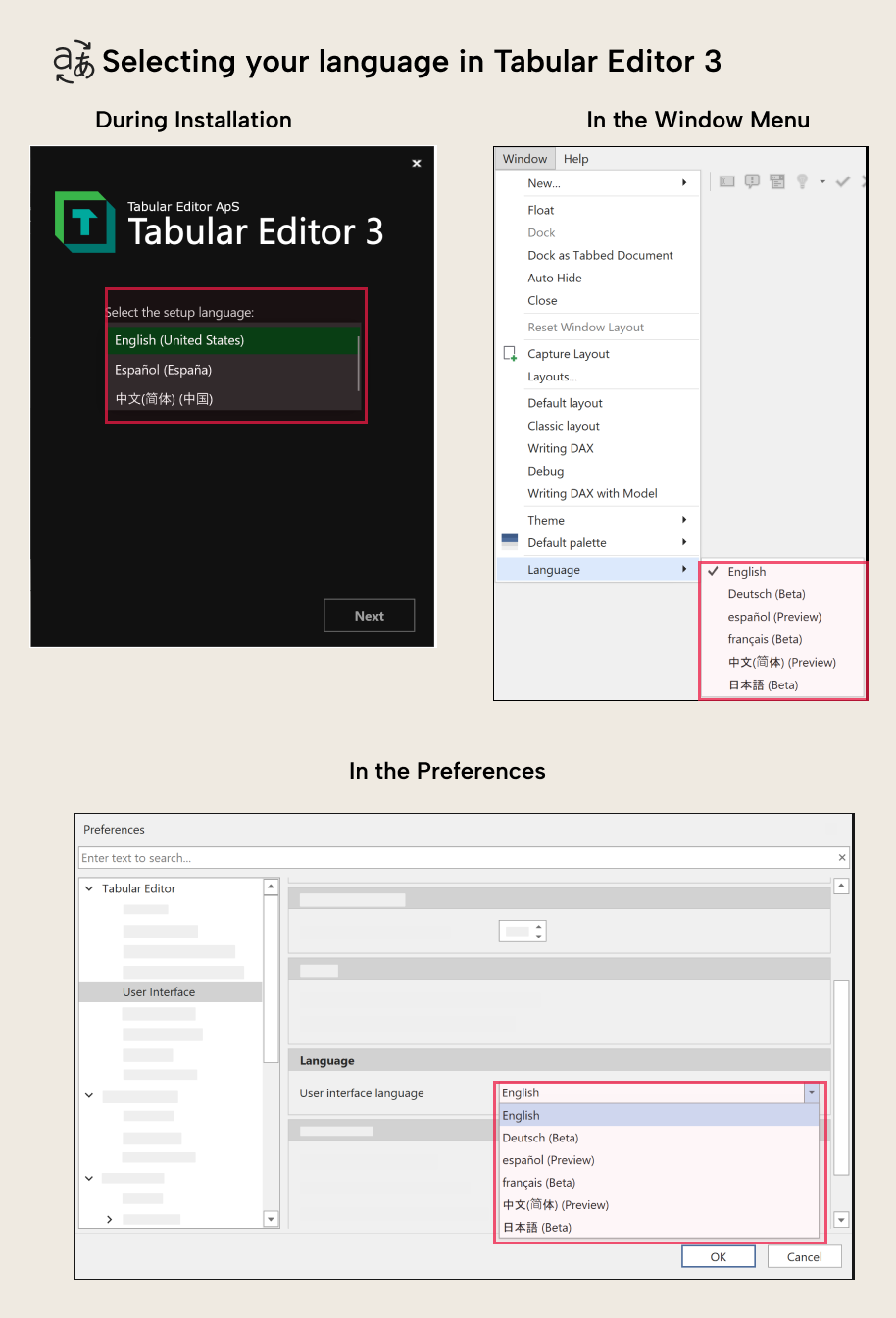
You can either set your language during the installation of Tabular Editor 3 or within the application itself:
Built-in best practice rules
A fundamental change to the Best Practice Analyzer has arrived in the form of built-in rules inside Tabular Editor 3. Within the Tabular Editor 3 team, we have identified general rules that we believe most semantic models ought to follow. We have vetted each rule to ensure that it is generally applicable and relevant.
The 27 read-only best practice rules cover 4 main areas:
- Error Prevention: Invalid characters, missing expressions, data type mismatches
- Performance: Relationships, partitions, aggregations
- Formatting: Format strings, visibility, naming conventions
- Maintenance: Descriptions, calculation groups, unused objects
The rules are built into the application, meaning that they will be updated with new releases and be consistent across all users in a team. We have a knowledge base of articles for each rule to dive deeper into what each one is for and what causes it. The rules can be toggled globally in preferences for each user, or you can decide which you want to apply to your model on an individual basis. They also work seamlessly with your existing BPA Rules.
Semantic Bridge for Databricks metric views
The January release includes a fantastic new feature we developed in partnership with our friends from Advancing Analytics: The ability to create a Power BI semantic model directly from a Databricks metric view. Tabular Editor 3 opens a new avenue of platform interoperability, which helps those who use Databricks to use the full Databricks platform while taking advantage of Power BI as a reporting platform.
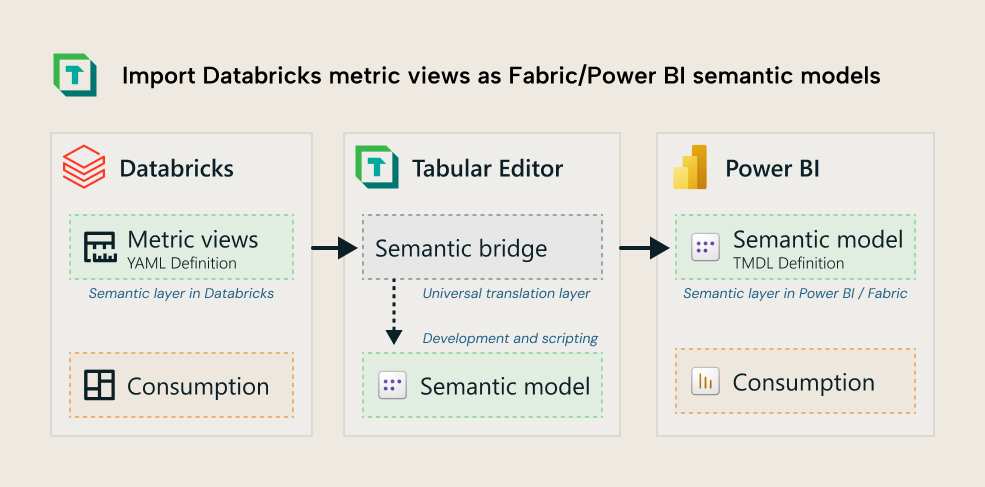
NOTE
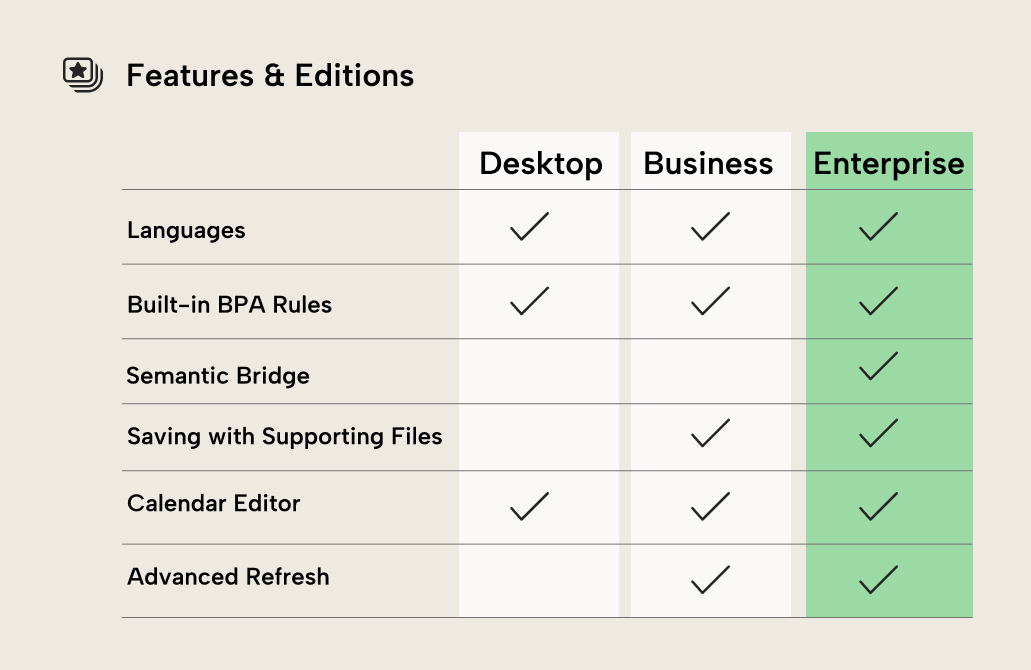
This feature is only available in the Enterprise Edition of Tabular Editor 3. (And thus the trial version)
For all the details of this new feature, please read our documentation article.
Saving with supporting Fabric files
To enable easier Git integration with Fabric, Tabular Editor can now save your TMDL or .bim model along with the required supporting files. This means that Tabular Editor automatically generates the .platform and other files that Fabric expects. To understand more about Git integration in Fabric, please see the Microsoft Fabric documentation.
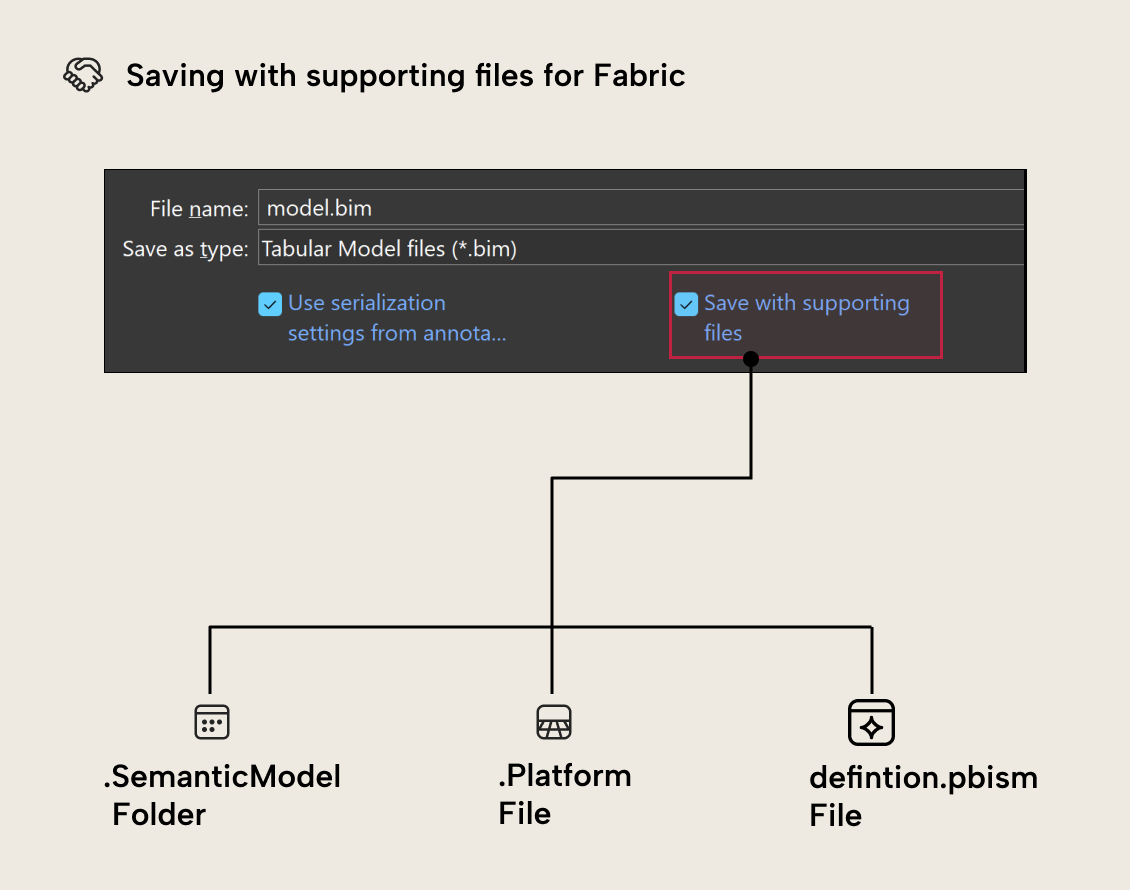
For further details about the supporting files and how they enable Git in Fabric, please refer to our documentation.
Calendar editor
Enhanced Time Intelligence, or calendars as they are known inside the semantic model, is a new feature introduced in semantic models in the fall of 2025 and supported from day 0 in Tabular Editor. With the January release of Tabular Editor 3, we have developed a dedicated editor that makes it easier to create, edit, and maintain Calendar objects in your semantic model.
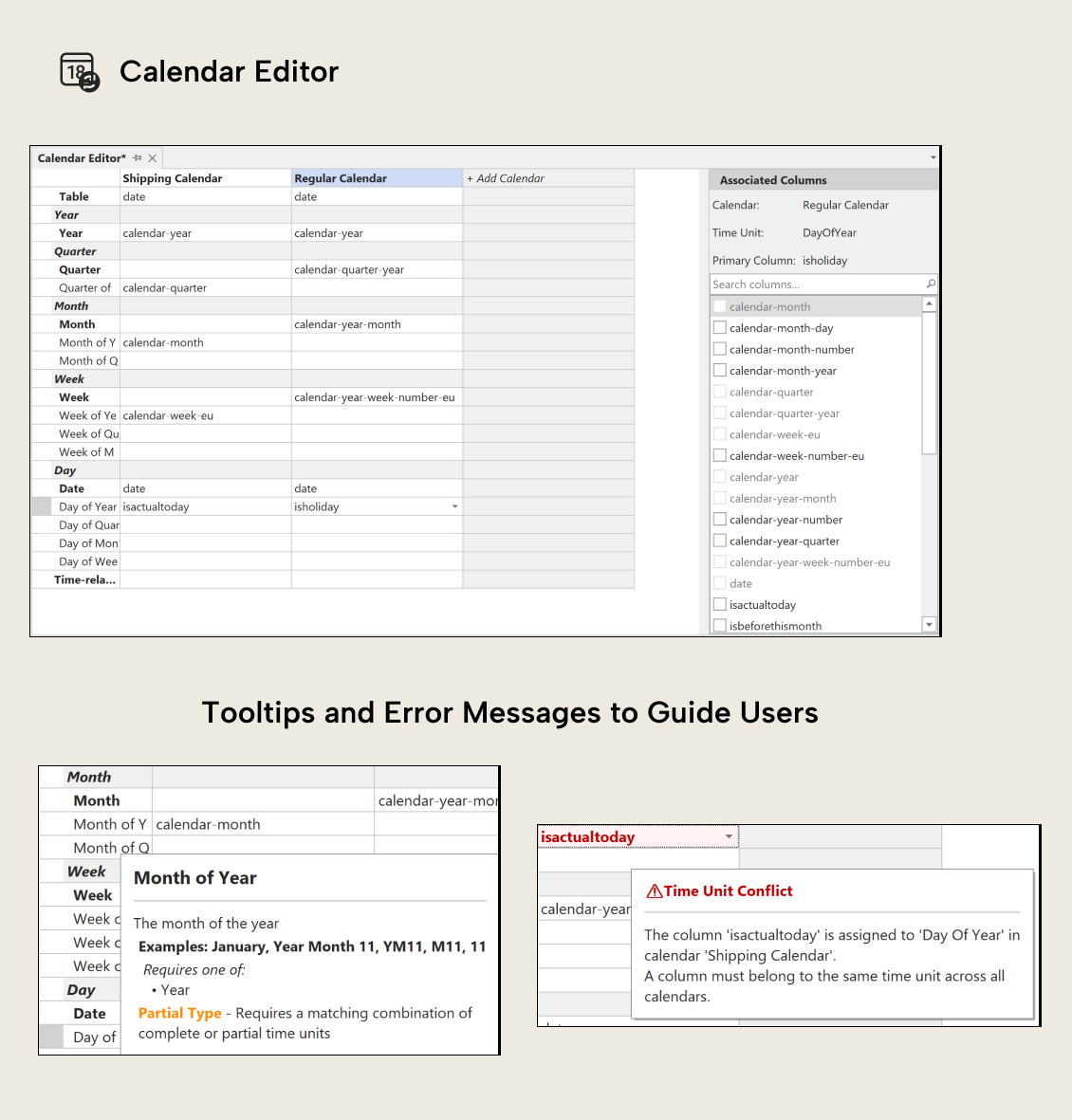
There are various hover options in the editor that provide additional context and examples of how to use each calendar field, as well as internal validation to ensure the calendar setup is valid.
We have also made several other improvements around how calendars are edited in Tabular Editor 3. For example, when copying and pasting a calendar from one table to another, the column mappings and associations are copied to the new calendar, provided they exist in the new table.
Additional improvements
In addition to the above major features, we have made several additional improvements in this release. The DAX Package Manager now displays package icons in the UI and caches metadata when browsing packages, and in the data area, it is now possible to use CustomData to impersonate users, which is especially useful in Power BI embedded scenarios.
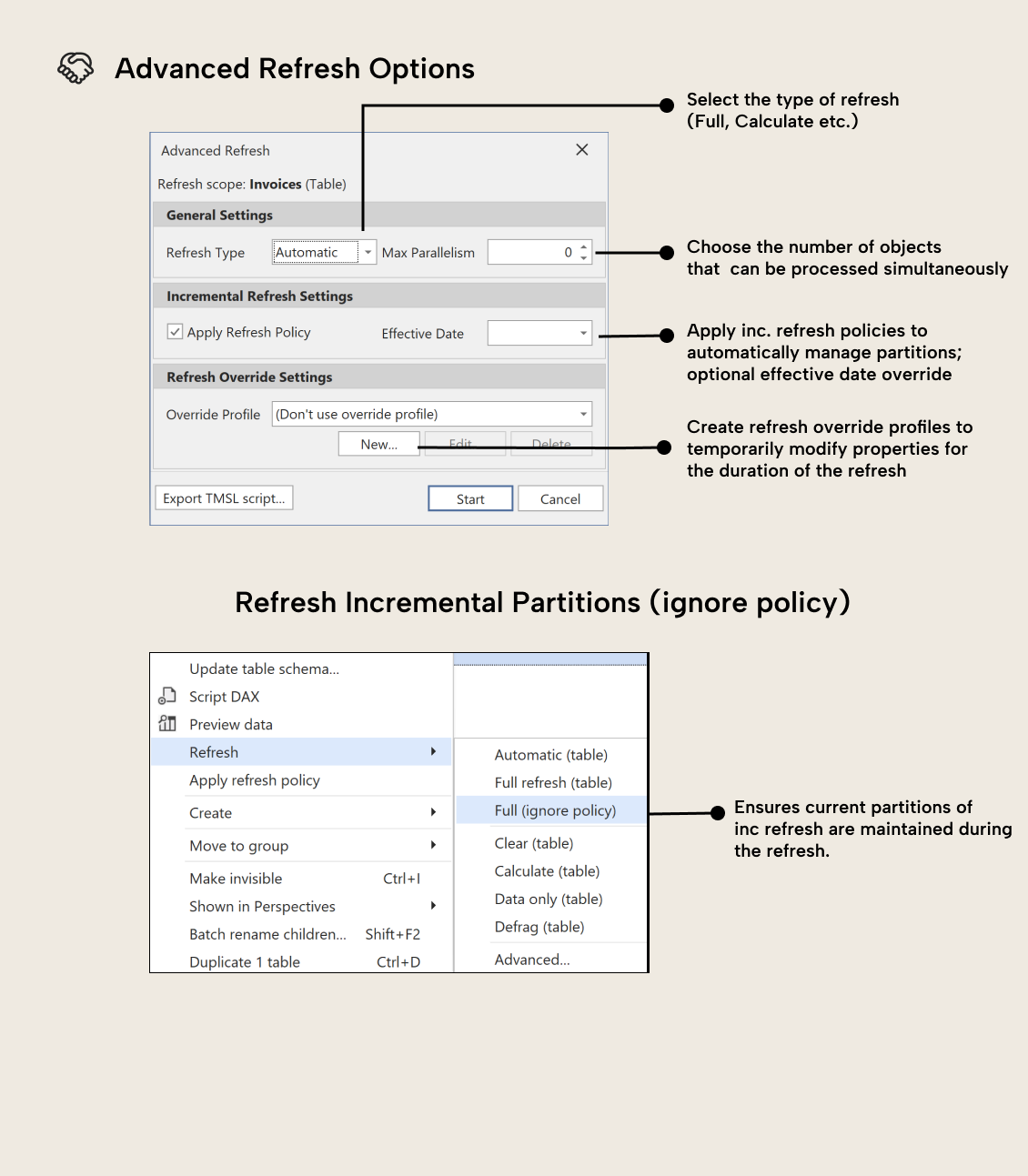
We have introduced both an advanced refresh option and a new refresh option, “Refresh full (ignore policy)”, to better handle incremental refresh and reload data into existing partitions without triggering refresh operations that would change the partition structure. Together with that work, we have also added a new Start Time column in the Data Refresh view to make it easier to sort your data refreshes.
On the modeling and scripting side, we’ve added new Power BI-specific column data categories that help support map visualizations: Longitude, Latitude, and Place. We expanded Best Practice Rule editor coverage with User Defined Functions and Calendars, and introduced a UsedInCalendars column property to simplify advanced C# automation scenarios.
Please refer to the release notes for the details on additional improvements and bug fixes.
Feature editions
Two of the features mentioned above are only available in certain Editions of Tabular Editor 3. Please refer to this table for an overview.
For further reading
- Rule authoring guidance (Tabular Editor). Explains the broader context for best practice rules and how to write custom ones, complementing the built-in rules introduced in this release.
- Databricks import documentation (Tabular Editor Docs). Covers how to import Databricks metric views and map them to Power BI semantic model objects.
In conclusion
Version 3.25.0 of Tabular Editor 3 includes new major capabilities that we're excited to release. With language support, built-in BPA rules, Databricks interoperability, and a strong focus on stability and usability, this release demonstrates that Tabular Editor 3 is a central tool for building and maintaining high-quality semantic models. Make sure you download it right away to get all the latest features and improvements.
Use Tabular Editor 3 in your preferred interface language and manage semantic models with the current toolset.
Give Tabular Editor a spin