Key takeaways
- AI Agent skills are simple: A skill is a folder with a Markdown file, with optional references and script files.
- Skills encourage progressive disclosure: Skills improve cost and performance by only loading a short description until invoked. They also offload work to executable script and postpone reading with reference files.
- Skills should be developed iteratively: The best way to write a skill is to have an agent perform a task and then document the issues the agent ran into and then repeat. In many cases, overly prescriptive skills can cause confusion instead of helping.
- AI should not write its own skills: AI Agent skills written by AI are more verbose, more expensive, and potentially perform worse. AI can help you draft a skill, but you should be writing it.
This summary is produced by the author, and not by AI.
Skills are a simple but powerful tool
AI skills, at their very simplest, are just text prompts stored in a SKILL.md markdown file, along with some supporting reference, script, and asset files. There is no magic here. However, skills are quite valuable for making AI agents more reliable and for sharing capabilities with the rest of your organization.
These skills are installed either in a configuration folder specific to the project or in a global configuration folder. The location for either depends on the agent harness you are using, such as Claude Code or GitHub Copilot.
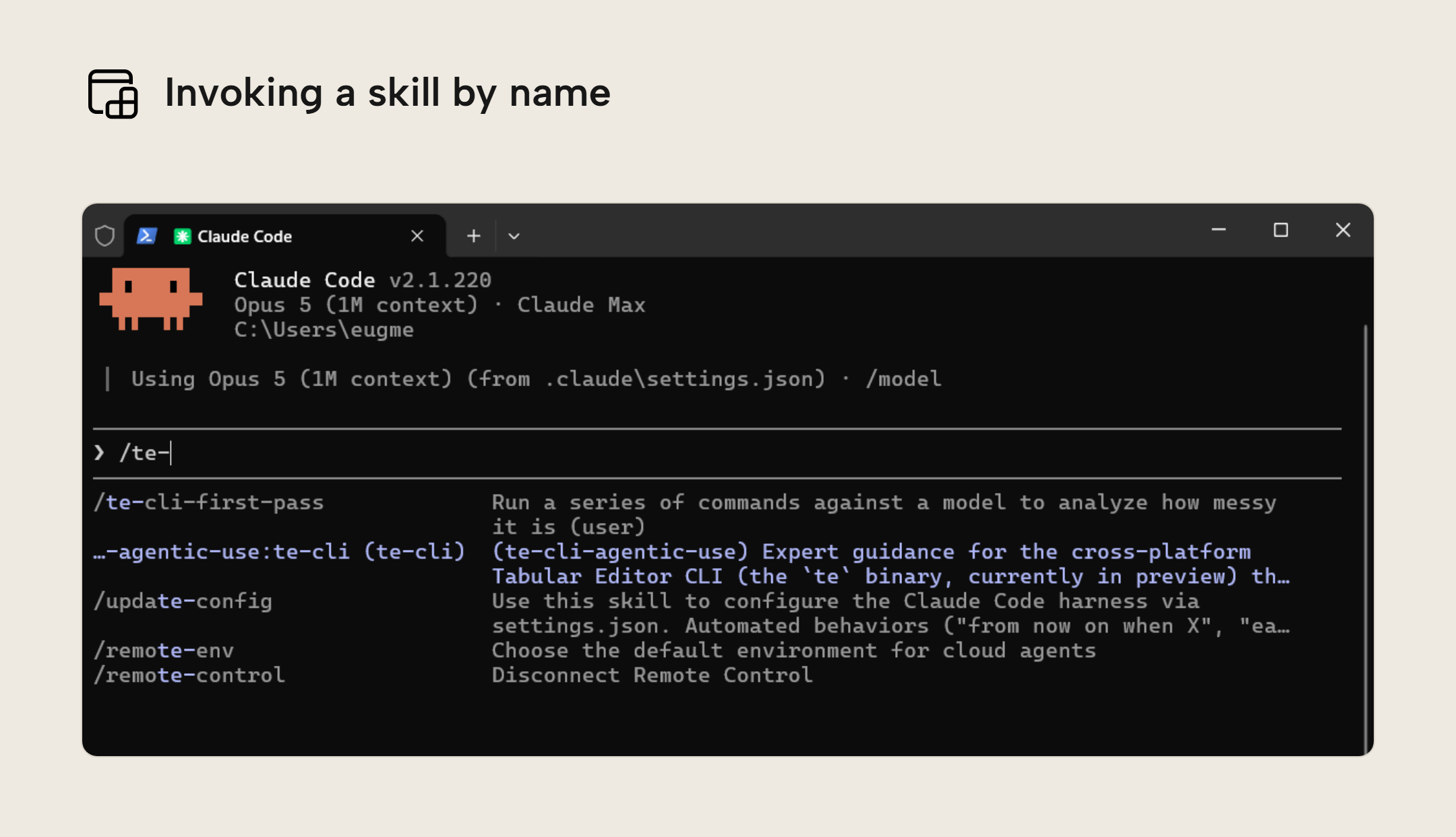
Once a skill has been installed, it’s simply a matter of typing a slash and then the skill name along with any supporting guidance. Then the agent will load the skill as a reusable prompt. Most skills can also be called by the agent itself, unless that is specifically disabled in the skill definition. In the screenshot below you can see the list of skills that show up when typing /te-. Pressing enter would run the skill and pressing tab would complete the skill name.
WARNING
Pointing your agent at a skill file and telling it to read the file is not the same as installing a skill. Doing so misses out on all of the integration with the harness as well as the progressive disclosure benefits we cover below.
Additionally, if your agent harness supports the allowed-tools feature, you miss out on the convenience feature of pre-approving certain safe tools.
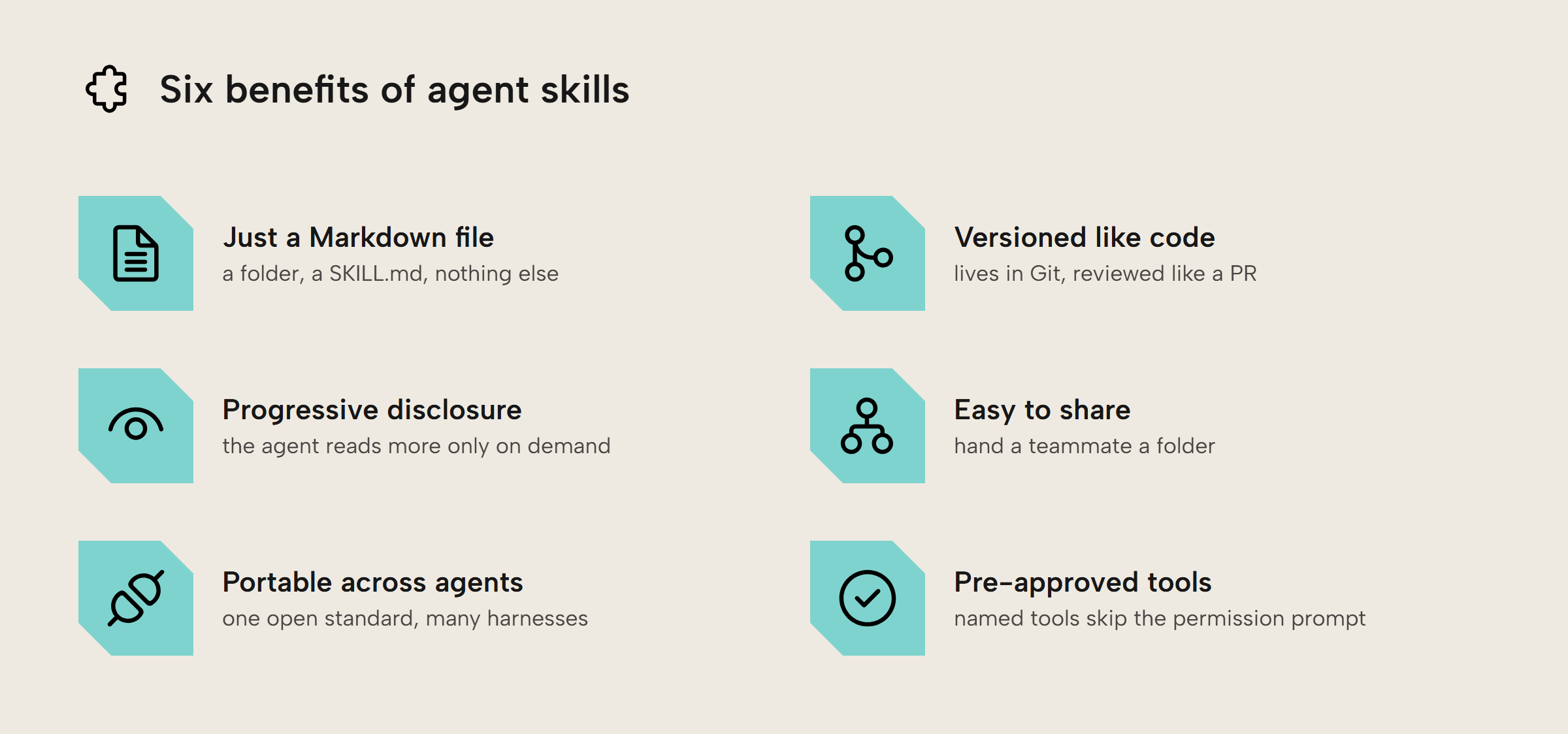
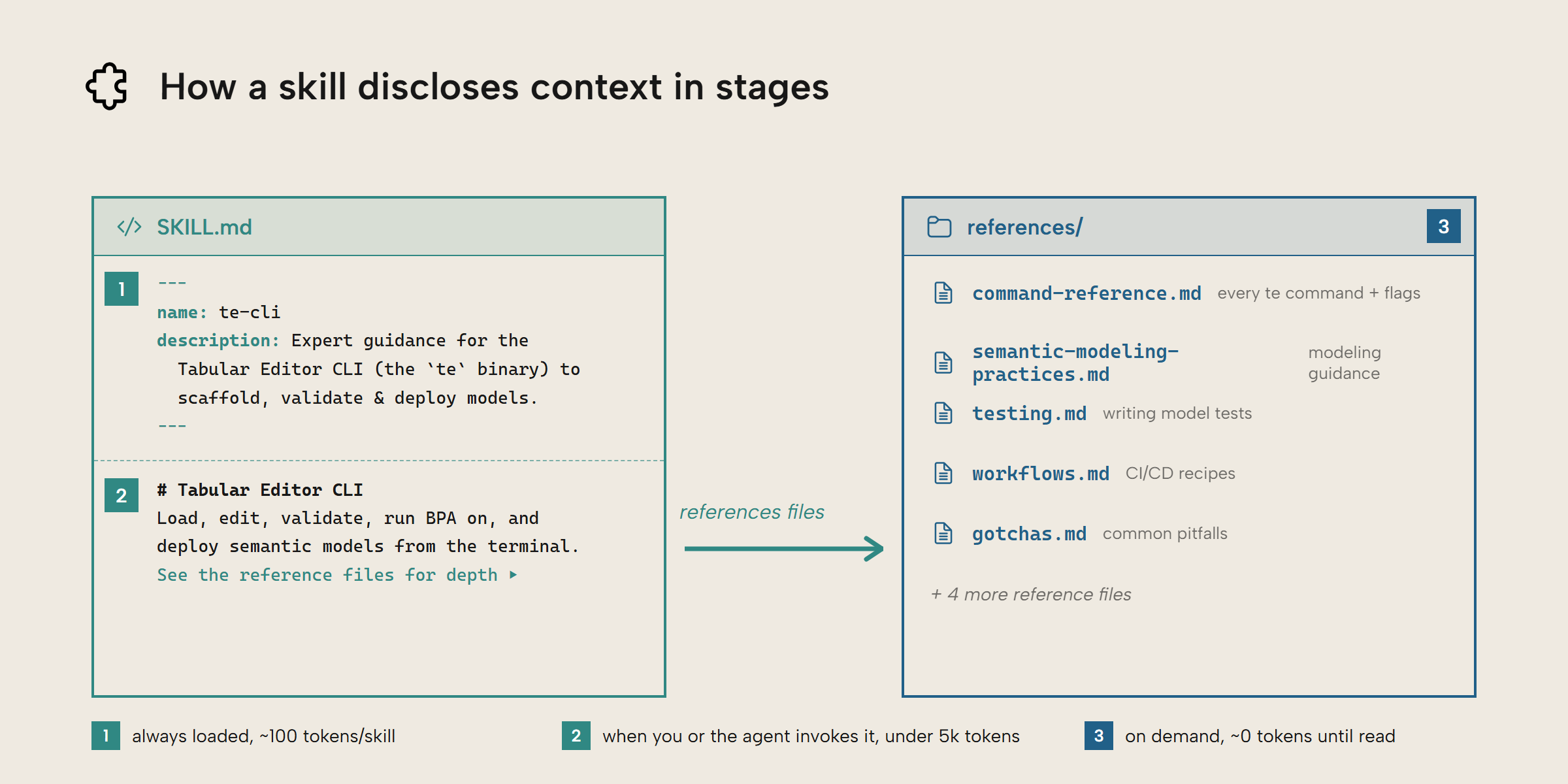
One of the benefits of skills is that they are designed to take advantage of progressive disclosure. This means that the agent reads progressively more about the skill, on-demand. This is valuable because always-loaded context increases costs and degrades agent performance.
Another benefit of skills is that they are easy to share and collaborate on. While CLIs and MCP servers are useful, they make more sense as packaged programs shared from a central source and consumed by users. Skills, on the other hand, can be kept in a Git repository and versioned like any other piece of code or documentation.
Skills operate in a hybrid space between documentation and code. Skills can come with executable code but the prompt itself is not code. You should treat skill writing as a writing and communication challenge, but you should store, track, and maintain them as if they were code.
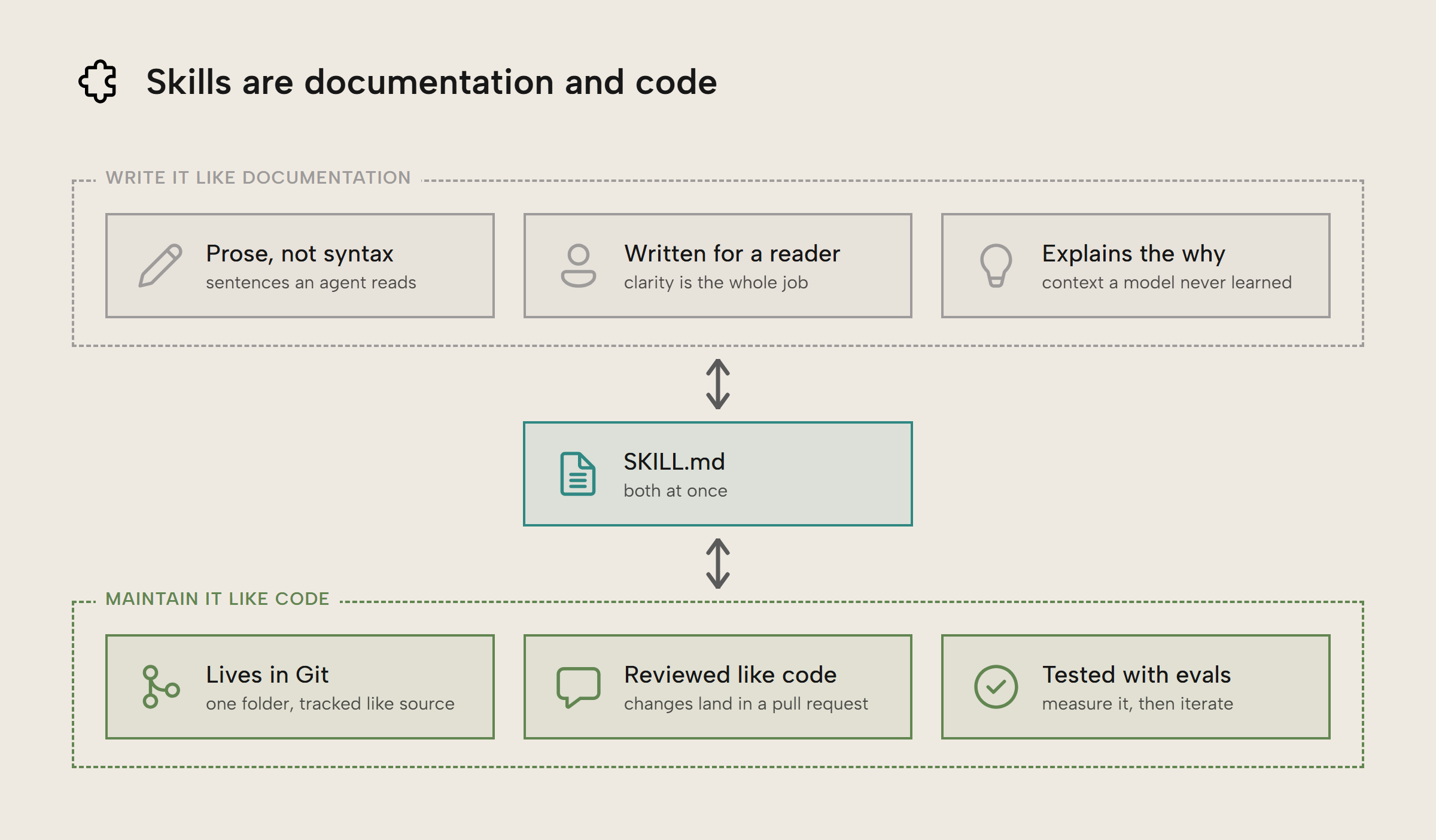
In fact, in a recent article by Anthropic, they recommended treating the skills for a data model as first-class citizens and storing them alongside the code for the model. This was to ensure that skills were updated frequently along with the model, otherwise the effectiveness of those skills would degrade.
In advanced scenarios, such as the Anthropic case, companies will run automated quality evaluations, often shortened to just “evals”. Evals can be incredibly useful in measuring the success and improvement of skills, given than AI agents are non-deterministic and unpredictable. However, they also require a sophisticated set up and can be expensive to set up. Evals only make sense after many manual iterations and improvements.
Understanding the skill specification
Skills, despite being simple, are an open standard originally created by Anthropic, similar to the Model Context Protocol standard which was also created by them. Skills were presented as a complement to MCP servers as a way of extending AI agents. MCP servers are not as flexible as skills, since they provide a predefined set of tools that the user can’t modify.
As far as technical standards go, the one for agent skills is ridiculously simple. A skill is a markdown file consisting of three parts: the name of the skill, a short description of the skill, and then a prompt of general instructions for the AI. The frontmatter can contain other optional metadata you can choose to include, like the tools the agent is allowed to use.
Optionally, it can include a references folder for reference material that shouldn’t be loaded every time. It can also include a scripts folder for code the agent can run. Finally, you may include other folders, such as an assets folder.
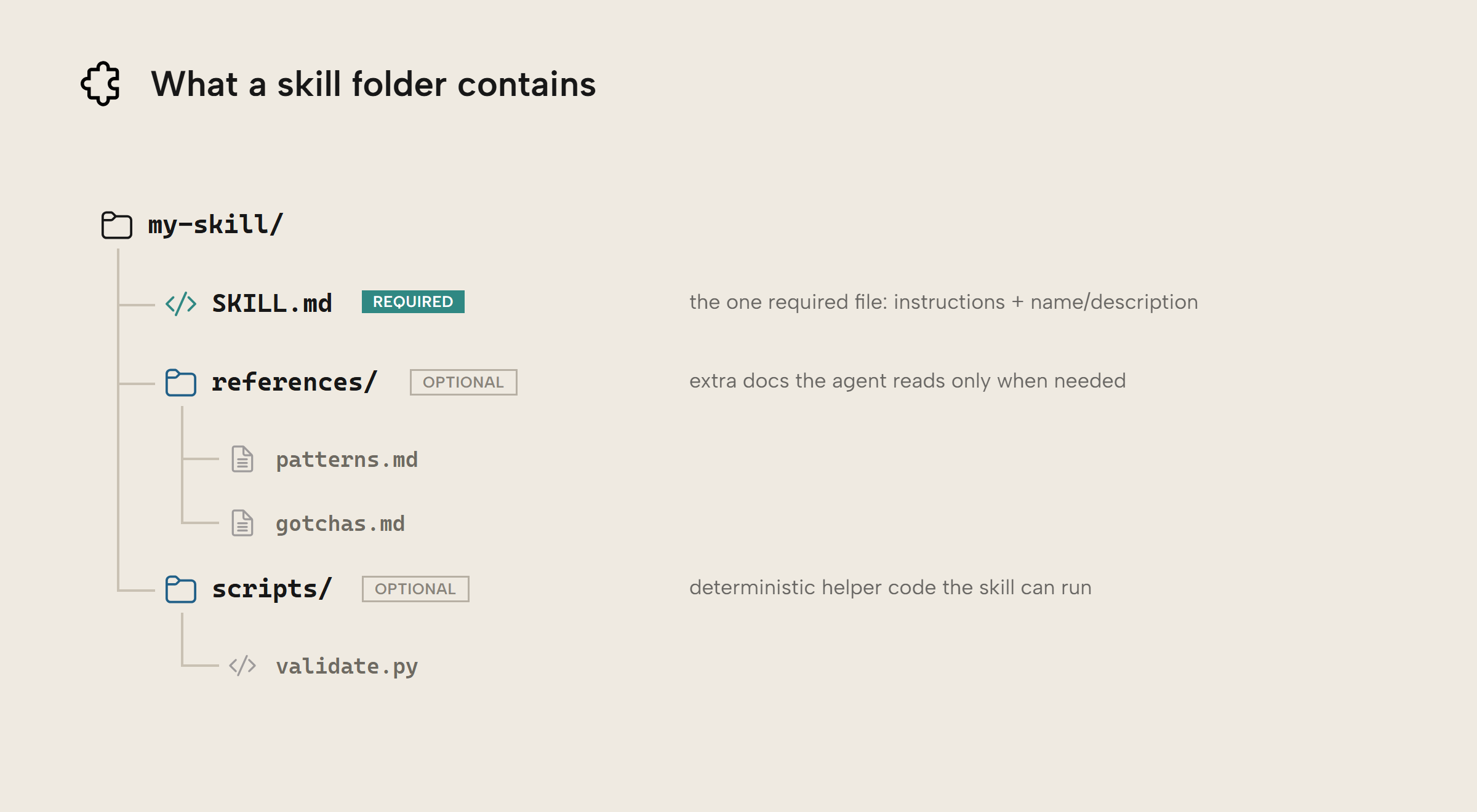
So, if you could write out this standard on the back of a napkin, why does it need to be a standard at all? Well, I think there are two main benefits of this being a standard. First, it leads to more reliable integration with various coding harnesses. That said, implementation varies quite a bit by harness. The allowed-tools setting is currently experimental for example.
Second is that skills, unlike MCP servers, naturally encourage progressive disclosure which improves cost and performance when using AI agents. The frontmatter of the skill is the part that’s always loaded into the context window of the agent. The full instructions are not read until a human or agent decides to invoke that skill. Even then, you may decide to have a references folder to handle niche situations, such as using the Fabric CLI in tandem with the TE CLI, to avoid filling the context window with unnecessary information.
Writing your first skill
Writing your first skill is easier than it might seem. Take a task that you already do and have the agent attempt to perform it. Then note any areas where the agent made incorrect assumptions, got confused or needed guidance. Then, importantly, test the agent again against the skill and iteratively make changes. As models get more powerful, less and less needs to be explicitly said.
A skill should contain guidance that is not in the model’s training data, preferences or information specific to you or your organization, and pitfalls or gotchas that you have observed the agent running into. One way of thinking about this is if you hired someone who was technically brilliant, there are many things specific to your company and the way you do things that they would have no way of knowing. These are the things to put into a skill.
Below is a very simple example of a skill you could write to go with the official TE CLI skill. Here it is largely encoding your personal preferences and quirks of the TE CLI, both of which the model isn’t trained on. Note how we don’t have to explain to it how a CLI works or how to run terminal commands.
---
name: te-cli-first-pass
description: Run a series of commands against a model to analyze how messy it is
---

Use the /te-CLI skill, if available. If not, use te --help and te commandname --help before running any commands.

1. Check if you are connected to a model, if not ask the user what model to connect to.
2. Run `te list`. Take note of how many tables there are and if they all seem to be used.
3. Run `te vertipaq`. Investigate the largest tables and largest columns. Also identify any columns with more than a million rows of cardinality.
4. Run `te deps --unused` to identify objects that can potentially be removed.
5. Run `te bpa run` to identify other problems. Not every warning needs resolved
6. Use other non-destructive commands such as `te query` to explore further

Report back with an overall summary of how messy the model is and the top 5 quality improvements.
A skill should not contain information that is easily re-derived by the agent or information that the agent is heavily trained on (such as Python fundamentals).
Don’t let AI write your skills
Don’t have agents write their own skills. It is reasonable to have the agent summarize where it ran into issues and you had to correct it, and then have it write the first draft. In general though, skills should always be hand-curated. Otherwise, AI slop behaviors, such as adding the date to comments, risk being amplified.
WARNING
While it can be useful for brainstorming, one study found that purely AI-generated skills performed about 8-11 percentage points worse than no skills. Meanwhile, curated skills performed 18-25 percentage points better than no skills.
When I asked Claude Opus 5 to install the simple skill above, it “helpfully” rewrote it as a skill that is 4x as long as the original, which makes the skill 4x as expensive to read. Much of that was rewriting what I said but in a more verbose way, but some of it was copying from the te-cli skill or adding instructions that were unnecessary.
What’s worse, however, is that two of the instructions were factually incorrect. The agent assumed completely ignored the fact that you can connect to a local PBIX model and made it sound like the CLI could only read local files or connect to deployed models. In this way, the AI-expanded skill was actively worse than no skill at all.
What the AI added to a skill
Hand-written
After the AI rewrote it
Hand-written skill, passage by passage
- Load the te-cli skill (Original instruction 19 words). Use the /te-CLI skill, if available. If not, use te --help and te commandname --help before running any commands.
- Step 1: establish connection (Original instruction 19 words). 1. Check if you are connected to a model, if not ask the user what model to connect to.
- Step 2: te list (Original instruction 20 words). 2. Run te list. Take note of how many tables there are and if they all seem to be used.
- Step 3: te vertipaq (Original instruction 23 words). 3. Run te vertipaq. Investigate the largest tables and largest columns. Also identify any columns with more than a million rows of cardinality.
- Step 4: te deps --unused (Original instruction 13 words). 4. Run te deps --unused to identify objects that can potentially be removed.
- Step 5: te bpa run (Original instruction 14 words). 5. Run te bpa run to identify other problems. Not every warning needs resolved
- Step 6: explore further (Original instruction 12 words). 6. Use other non-destructive commands such as te query to explore further
- The deliverable (Original instruction 18 words). Report back with an overall summary of how messy the model is and the top 5 quality improvements.
AI-rewritten skill, passage by passage
- Load the te-cli skill, by name (Original instruction 19 words, Unnecessary instruction 7 words). Use the te-cli skill if available (it is installed as the te-cli-agentic-use plugin). If not, run te --help and te <command> --help before running any commands.
- Read-only prohibition (Duplicate info 25 words, Unnecessary instruction 12 words). This audit is read-only. Never run te set, te add, te remove, te move, te replace, te save, te deploy, or te bpa run --fix during a first pass. Report what should change; let the user decide.
- --output-format json (Duplicate info 17 words). Pass --output-format json on every command. The default table output uses ANSI styling that mangles in transcripts.
- te connect and TE_SESSION (Duplicate info 45 words). te connect does not survive between Bash calls — each call is a fresh shell. Do not rely on an ambient connection. Either pass -m <model> (plus -s/-d for a remote model) on every single command, or set TE_SESSION=<name> before the first call and reuse it.
- -m versus -s/-d (Duplicate info 53 words). Flagged factually incorrect. Metadata commands (te list, te deps, te bpa run) work against a local model with -m <path>. Commands that execute DAX or read data (te query, te vertipaq, te refresh) need a deployed model via -s/-d; -m alone fails with "No server specified". The exception is te vertipaq --import <file.vpax>, which works offline.
- Auth failures (Duplicate info 31 words). If a command is blocked by permissions or auth, stop and ask rather than working around it. Check te auth status and have the user run te auth login if needed.
- Step 1: ask, do not guess (Unnecessary instruction 32 words, Original instruction 16 words). Flagged factually incorrect. Establish the target. Determine which model to analyze. If the user has not named one, ask — do not guess at a path or workspace. Confirm whether it is a local file (TMDL/BIM/PBIP) or a deployed model, since that decides which commands in step 3 and 6 are available.
- Step 2: te list (Original instruction 19 words, Unnecessary instruction 13 words). te list — inventory the model. Note how many tables there are, and whether they all appear to be used. Watch for staging or leftover tables, near-duplicate tables, and tables with no relationships.
- Step 3: te vertipaq (Original instruction 21 words, Unnecessary instruction 19 words). te vertipaq — size analysis. Investigate the largest tables and the largest columns. Explicitly identify any column with cardinality above 1 million, which is usually the dominant driver of model size. High-cardinality datetime, key, and free-text columns are the usual offenders.
- Step 4: te deps --unused --hidden (Unnecessary instruction 16 words, Possibly useful 11 words, Original instruction 7 words). te deps --unused — objects with no DAX references and no role in relationships, hierarchies, sort-by, variations, or time roles. These are removal candidates. Add --hidden to narrow to hidden-and-unused, which is the highest-confidence subset.
- Step 5: te bpa run, filtered (Unnecessary instruction 13 words, Original instruction 12 words, Possibly useful 8 words). te bpa run — Best Practice Analyzer findings. Not every warning needs resolving. Filter to what actually matters: correctness and performance issues over cosmetic naming rules. Note the rule ID for anything you recommend.
- Step 6: validate, find, downstream (Unnecessary instruction 32 words, Original instruction 20 words, Duplicate info 6 words). Explore further with other non-destructive commands. te validate catches broken DAX and relationship integrity problems and is worth running on any first pass. te query for DAX spot-checks (row counts, blank/orphan checks, distinct counts on suspect columns), te find to trace naming patterns, te deps <object> to check the blast radius of anything you plan to recommend removing.
- Verify before asserting (Possibly useful 46 words). Verify before asserting. If te deps --unused flags an object, confirm it is genuinely unreferenced before recommending removal — measures reached only from a report, a calculation group, or RLS can look unused to static analysis. Say when a recommendation is a candidate rather than a certainty.
- Evidence and costs (Unnecessary instruction 58 words, Original instruction 17 words, Possibly useful 6 words). An overall summary of how messy the model is. Give a plain, direct verdict backed by the specific numbers you found (table count, model size, worst columns, count of unused objects, BPA findings by severity). Avoid a bare score with no evidence. The top 5 quality improvements, ranked by impact. For each: what to change, why it matters, roughly what it costs to do, and the te command that would do it. Lead with size and correctness wins over cosmetic ones.
- Write it as prose (Unnecessary instruction 17 words). Write it as prose a data professional can act on, not a raw dump of command output.
What’s interesting is the agent (Opus 5) still did well even when it had no skills at all. Modern agents are adept at running te --help and working from there. In the no-skill scenario, it never ran te deps and it never highlighted the high cardinality columns. So, while it didn’t focus on my preferred steps, it still did an adequate job.
This all highlights that skills should focus on known gotcha, be clear about fragile or dangerous operations, map steps that match internal procedure or personal preferences, and avoid overprescribing. Much of this matches the best practices from the agent skills website.
For further reading
- Equipping agents for the real world with Agent Skills (Anthropic). An in-depth article introducing skills as a concept as well as how they work.
- How Anthropic enables self-service data analytics with Claude (Anthropic). An article covering the unique challenges using AI with semantic models, including skill management.
- Agent Skills specification (Agent Skills). The official standard for writing AI agent skills. It also includes best practices.
In conclusion
Skills are a flexible and powerful standard for guiding AI agents in certain tasks. They can be as simple as a dozen lines of text. Skills should be written cautiously, iteratively, and concisely.
Take your semantic models further with Tabular Editor.
Give Tabular Editor a spin