
Key takeaways
- Composite models extend centrally managed datasets: They let you augment a shared dataset with custom, user-specific data or logic, which empowers self-service analytics.
- They're for enriching, combining, and prototyping: Users can enrich or combine existing datasets and prototype new features on top of them.
- Direct Lake support is mode-dependent: Direct Lake on OneLake can participate in composite models, while Direct Lake on SQL endpoints remains more constrained.
- Smooth adoption takes some groundwork: Use perspectives, document hidden logic (for example via object descriptions), and train users so composite models work well.
This summary is produced by the author, and not by AI.
Benefits and use cases
Power BI provides a variety of ways to enable users with self-service analytics. For example, organizations can opt for a managed self-service BI model (instead of a centralized enterprise BI model). In this model, a Center of Excellence (COE) or central team of data professionals create and manage Power BI datasets. Business users consume these datasets from Power BI Desktop, Excel, or other analytics workloads in Fabric (like notebooks, which are fantastic, by the way) to address business problems with data.
A managed self-service BI model presents several advantages, including fewer requests for the central BI team and a preserved truth in re-usable shared datasets. However, this model also requires additional effort for governance. For example, central teams should train users to improve their data literacy and monitor what content is created and how it’s being used. Another challenge for these central datasets is incorporating new data.
In this article, we explore how this challenge is typically addressed, and how composite models can be an appealing solution.
Enriching or combining centrally managed Power BI datasets
Business data needs are constantly evolving as the business strategy adapts to change. It’s common for business users to request new data in upstream data sources so that they can answer new problems. This can be a difficult scenario for central teams to manage as they seek to balance user enablement with risk mitigation. How can you be flexible and promptly give people the data they need, but do so in a way that is sustainable and doesn’t create potential governance or compliance issues?
The following diagram depicts a common scenario where a business user wants to add a forecast (that’s specific to their business unit or region) to an existing, centrally managed dataset.
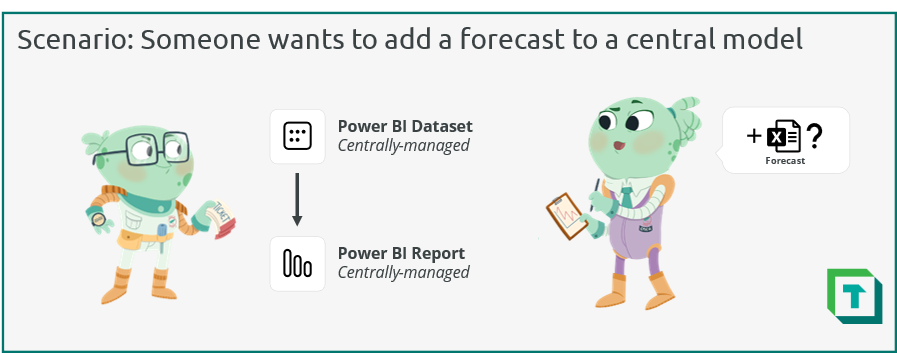
In this scenario, the central team managing the dataset has several options to address the request. However, none of the options are optimal for this team. These options either cost too much time or create too much risk. The following diagram illustrates three practical options.
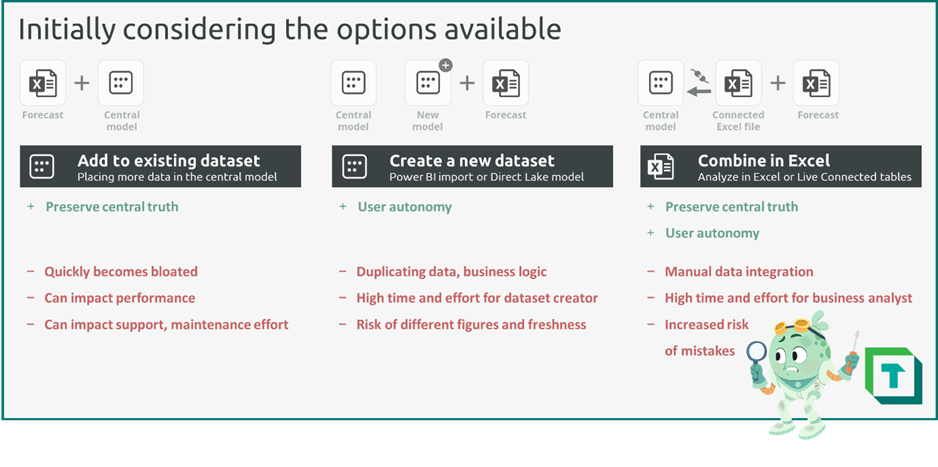
Before composite models, the team would have to do one of the following:
- Add the forecast to the existing dataset: The central team could integrate the forecast in the existing dataset or upstream data source. While a simpler option which does preserve the central truth, over time, this quickly can bloat the central model with dozens of niche sources. Adding additional data without discipline can be a slippery slope to performance issues and higher effort to maintain the model.
- Create a new dataset: The central team could create a copy of the original dataset that includes the forecast and only the data the user needs. Depending on their skill, the user themselves could manage this dataset. While this could enable the user without risking the central model, this approach poses obvious risks. There’s a high chance that the two datasets become out-of-sync, and creating and maintaining this second model will be a lot of effort. In general, duplicating data – or even just the business logic with DAX measures – risks poor outcomes.
- Combine in Excel: The central team could encourage the user to combine the data in Excel, leveraging Analyze in Excel or live connected tables. This maintains the central dataset, but the user is forced to combine the two sources manually in Excel, which has an elevated risk of mistakes and is a high effort investment. So, this option also isn’t ideal.
An additional option is to use Power BI composite models, which are generally available since April 2023. A composite model lets you enrich existing datasets with new data. This way, you preserve the truth and logic in central models, while still enabling users to add limited data to ask questions specific to them.
NOTE
As of June 28, 2026, Direct Lake support in composite models is mode-dependent. Microsoft guidance describes the main composite model considerations, while current Fabric documentation covers Direct Lake behavior. Direct Lake on SQL endpoints remains single-source and can't be added to a composite model; see the Direct Lake overview for the current limitations.
Use cases for Power BI composite models
By using composite models, you opt for more of a customizable managed self-service model. That’s because the datasets are being customized by a small subset of content creators who want to add their own data. However, this customization doesn’t change the existing dataset, but only enriches it with new data and business logic so that they can address their data needs.
The following diagram illustrates several use cases for composite models.
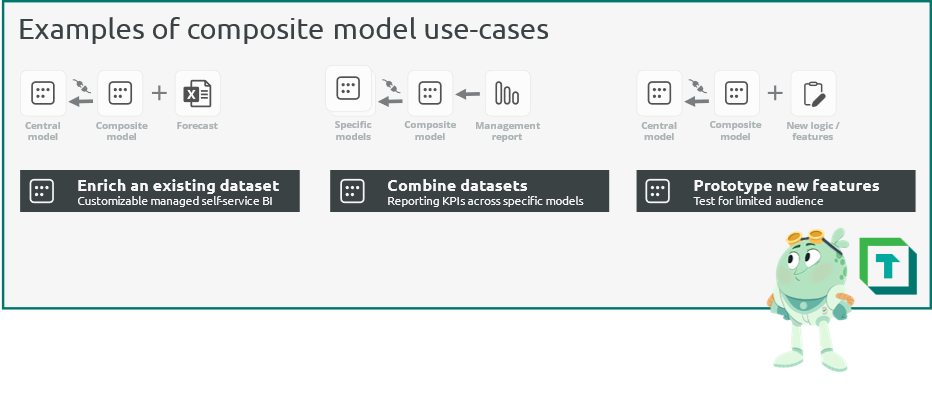
Composite models can be used in many different scenarios, such as:
- Enrich an existing dataset: The most common use-case of a composite model is to add new data to a centrally managed model. In this scenario, a more advanced self-service user connects to the dataset and adds additional data from other sources. Specific examples could be:
- Adding team-specific targets, like budgets, forecasts, or other examples.
- Using different master data, for example when performing point-of-sale or rebate analysis on sales data and aligning customer master data to your own transactions.
- Adding specific data not in scope of central models, like those of legacy systems that haven’t yet been integrated to a unified architecture.
- Combine datasets: With composite models, you can combine multiple datasets. This can be helpful to create high-level management reports, for example, which combine multiple KPIs across specific datasets.
- Prototype new features: By using a composite model to add new business logic to an existing dataset, the central team can prototype and test new features to specific target audiences, before including these features in the central model.
Additional information about use cases is documented in the official Microsoft guidance.
IMPORTANT
Composite models aren't intended to be a basis for the architecture of your Power BI datasets. Instead, they should be considered a good option to enable specific use cases and scenarios. For example, composite models can enable decentralized self-service creators to enrich central models with their own data and logic in Personal BI and Team BI usage scenarios.
Carefully consider the many implications and considerations described in the Microsoft guidance and the DAX considerations described by SQLBI before adopting and using composite models in your organization. Also, ensure that you train the appropriate segments of your user community about how to effectively handle these implications and considerations.
Making the most of composite models
Composite models can provide many benefits. They help you preserve central business logic and data, while still enabling advanced users to do more with the dataset. That said, there are some key factors to consider using composite models successfully.
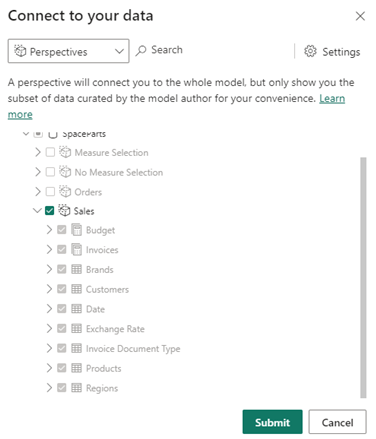
- Use perspectives: When creating a composite model, self-service creators have the option to select a perspective. Curating perspectives into common views helpful for consumers makes a more convenient experience. Furthermore, it can help you better leverage other features in Power BI, like personalize visuals. Personalize visuals is a helpful way to enable self-service analytics to users who don’t want the added hassle and complexity of creating new data and reporting items. You can create and manage perspectives in Power BI datasets by using Tabular Editor 3.
- Select and train users to use it effectively: Given their implications and limitations, composite models require special attention for user enablement. Consider carefully who will benefit from this feature, and how you will train them to use it. Such a training should focus on the use cases and limitations, and how to identify and handle the limitations. Additionally, ensure that central team members are aware of the special considerations for optimizing composite models. Read carefully the Microsoft guidance.
- Have useful, concise documentation: When connected to a composite model, users can't see object definitions, like DAX formulas or Partition queries. This can create complex or frustrating scenarios for users who want to add their own logic, as they lack sufficient transparency of the underlying central model. In this scenario, there’s an elevated risk of the user creating erroneous or poorly performant code, despite their competence. To avoid this scenario, you should consider a way to improve the transparency of the model, such as exposing a data dictionary, documentation, or even having DAX expressions in the object descriptions. Useful ways to do these things can be with Tabular Editor C# scripting.
- Use dataset endorsement: Consider taking the necessary steps to improve the data discovery and democratization in your organization. Ensure that trusted, high-quality data sources are easy to find and recognize. A straightforward way to do this is by using the endorsement and discoverability features of Fabric, which make it easier for users to find datasets (for example in the OneLake Data Hub).
- Avoid unnecessary chaining of datasets: With composite models, it’s tempting to use them for all use cases with potentially duplicated business logic or data. However, composite models have a variety of performance implications that can make this a poor choice. As with all design decisions, it depends on the data, the model, and the specific business logic in your scenario. Consider carefully all your available alternatives, like leveraging Power BI Dataflows for reusing conformed dimensions, or using the Master Model Pattern with Tabular Editor and scripting/automation to better manage reused model logic.
- Consider alternatives: With Microsoft Fabric, there are other alternatives to composite models. When you want to preserve a central truth while enabling users to add their own data, consider leveraging the “single copy philosophy” of OneLake. When Power BI datasets are using the Direct Lake storage mode and connected to the same data source, data isn't being duplicated. This means you can create two Direct Lake datasets that use the same data, without duplicating that information. However, the business logic in DAX formulas and model relationships are configured in the datasets. As such, they’re still duplicated between the datasets, requiring careful management of this logic (for example, by using the Master Model Pattern mentioned in the previous bullet point).
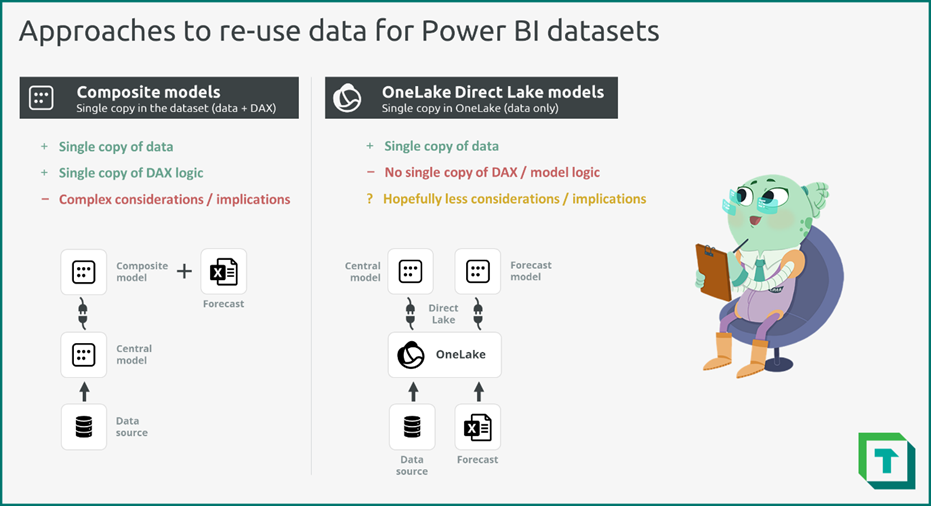
As with any model design decisions, consider carefully the available options. Test these options before you apply them, weighing the pros and cons and their impact for your functionality, performance, and other relevant factors.
For further reading
- Data model types, examples, and tips for Power BI (Part 1) (Tabular Editor). Where composite fits among Import, DirectQuery, Direct Lake, and the rest.
- Data model types, examples, and tips for Power BI (Part 2) (Tabular Editor). Star schema and other designs for the local part of a composite model.
- Microsoft guidance (Microsoft Learn). Microsoft's reference for supported composite model patterns, limitations, and modeling trade-offs.
- Direct Lake overview (Microsoft Learn). Current Direct Lake storage-mode behavior, limitations, and how it combines with other table modes.
In conclusion
Composite models provide an elegant solution to a frequent problem: allowing end-users to incorporate new data, while still preserving central logic and truth. While there are key factors and implications to consider, leveraging composite models can be a useful option to enable advanced self-service users to do more with Power BI and Fabric.
NOTE
Tabular Editor 3 supports composite model workflows through XMLA and model metadata. For automation, use the current C# scripting documentation.

Make composite model boundaries easier to understand in Tabular Editor 3.
Give Tabular Editor a spin