Key Takeaways
- CI/CD is for everyone: Even if you aren’t a professional programmer, incremental improvements in process can reduce defects and frustration. CI/CD also helps reduce messes made by AI Agents.
- Start by making changes smaller: Use PBIP, TMDL, and very basic Git use to make your changes smaller and more manageable. This makes it easier to revert changes and identify the root cause of breaking changes.
- Separate dev, test, and prod: Different environments allow you to test and identify issues earlier. Additionally, different environments can have different levels of quality enforcement and strictness.
- Add automation: A key part of CI/CD is automated tests and quality checks. The safer it is to make changes, the faster you can deliver new features and the less painful it is to push small incremental work to production.
This summary is produced by the author, and not by AI.
CI/CD practices benefit everyone
Continuous Integration / Continuous Delivery (CI/CD) is the software development practice of constantly having new features and changes be saved and brought into a shared environment (integration) and then built into a state for testing and review (delivery). This is in contrast to doing all of your report development in a single PBIX file, making a large batch of changes, and then deploying them all to production.
It’s tempting to assume that these practices are only for large enterprises or professional software companies. In this article, we argue that many CI/CD and related practices form a maturity ladder you can climb, incrementally. Even basic steps can be useful. This is true even if you are the only developer in an organization. To use an analogy, you should still wear a seatbelt even if you aren’t a professional racecar driver.
TIP
As AI agents become more popular, CI/CD techniques become more and more critical to prevent issues. AI agents are powerful but prone to errors, both obvious and subtle. Adding in layers of guardrails and quality control helps both humans and AI.
The general idea with CI/CD is that if you can deliver smaller pieces of work with testing at each stage, it becomes easier to prevent defects and diagnose the cause of those defects. CI/CD also means tracking those changes and having dedicated testing environments. Automating those tests mean that it is possible to keep releases in a reliable and known good state. For reports this automated testing means scanning for best practices, confirming that measures report expected values, confirming that visuals still render, and more.
You can imagine how a strong CI/CD process can help with Power BI reports. If all you have for your report deliverables are PBIX files, changes tend to be much larger and grouped together. If a user finds an issue with a report, you may have to hope you have an old copy of a PBIX lying around. Trying to fix the change can be quite challenging. Even then, you may not remember what you changed, making it harder to pinpoint the root cause.
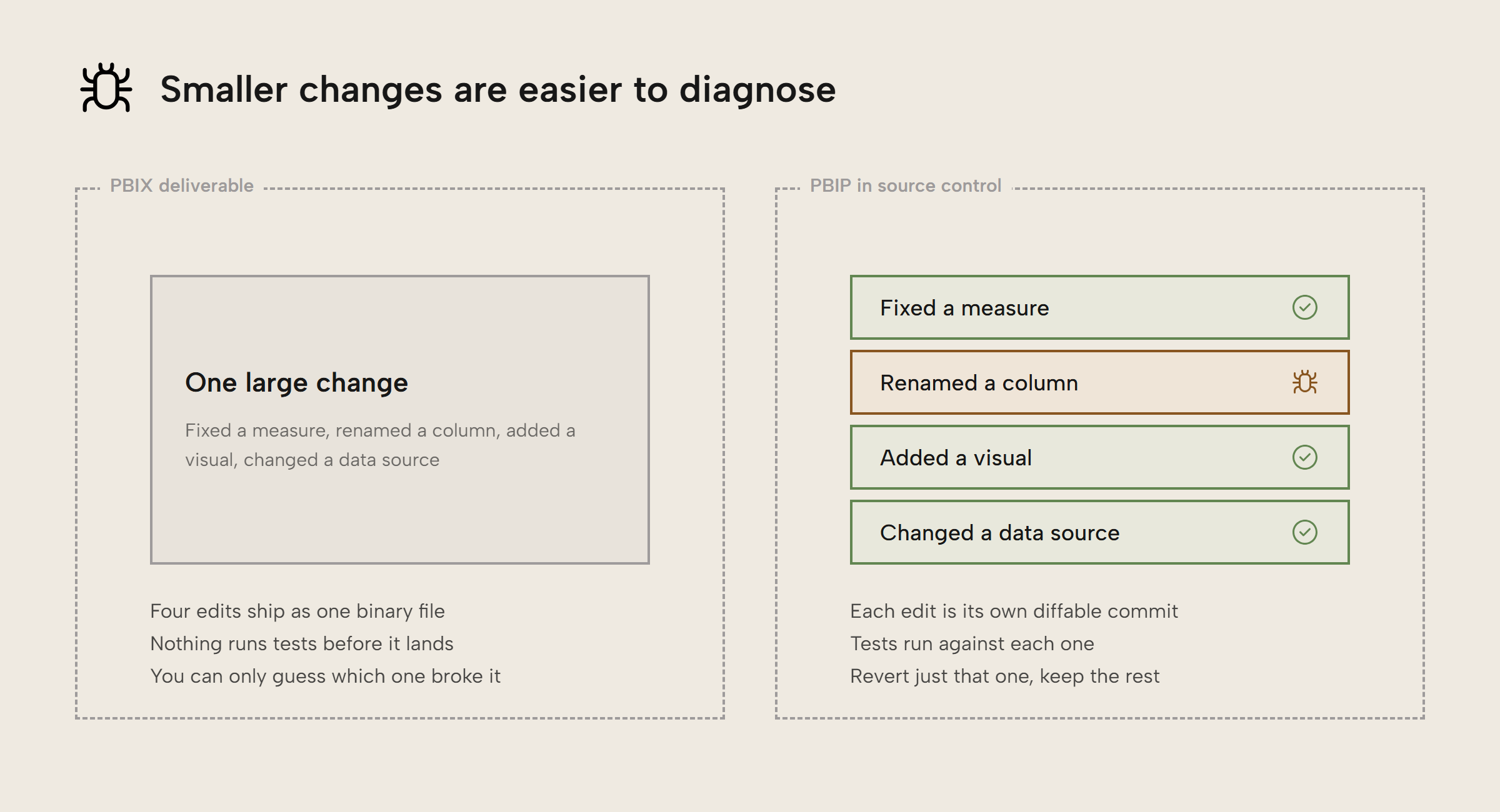
In contrast, if you make use of the PBIP format and have all of it stored in source control, it’s much easier to track each and every small change, down to the line of code. It then becomes easier to track “what changed?” when a user says the numbers are wrong. You can revert back to an earlier version or surgically undo a single error, all without having to lose work. Source control also makes it much easier to have separate development, test, and production environments so that you can catch bugs or issues before they get to production.
NOTE
Source control is software dedicated to tracking the source code for software programs. Git is the de facto choice for managing source control. Source control allows for creating “branches” which you can think of like splitting a timeline in a time-travel movie. This allows developers to safely test new features without affecting the main codebase. These changes can then be re-combined or “merged” back in later on.
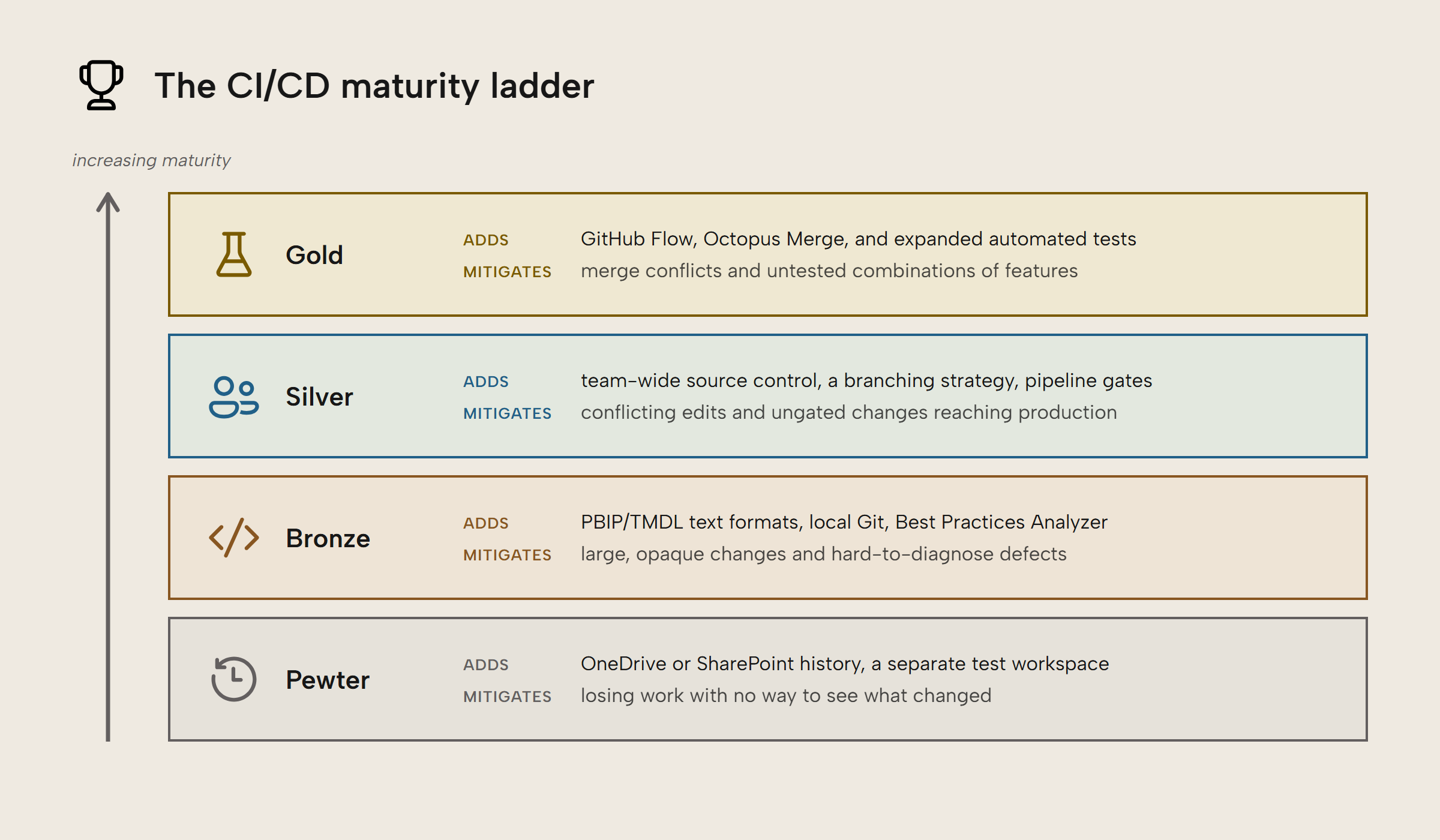
In the rest of this article, we are going to cover several layers of CI/CD maturity for semantic models ranging from pewter to gold, the idea being that even small incremental improvements can provide significant benefits. These levels are a rough guideline, not a strict map. It’s entirely possible an organization might be using test workspaces with no source control and vice versa. The highest levels require buy-in from your team and organization, which can take time and work. But you can start taking small steps today with a minimum of effort.
Pewter-level maturity
This level is whatever most folks do when they start out, typically storing PBIX files somewhere locally and publishing from Power BI Desktop. This presents a number of risks. Changes are generally larger, unless you meticulously keep copies of every change. If you do, each copy can take up significant storage space. One could argue that storing dated copies of PBIX is a very crude form of version history.
A slightly more robust situation is using OneDrive or SharePoint for version history and management. Both naturally keep a basic history of updated files and SharePoint has support for checking in and checking out files to control who is allowed to make edits. Very early on in the life of Power BI (think 2017), this was the encouraged way of tracking changes with Power BI because we didn’t have the PBIP format yet.
In fact, Microsoft supports automatically publishing reports from OneDrive or SharePoint as well as refreshing semantic models. This is a wonderful feature for anyone who is uncomfortable or inexperienced with coding. However, if you are willing to branch out a bit we strongly encourage working up to the next level of maturity and learning the basics of Git source control. If you are using AI agents in any capacity, this is an absolute must so they are less likely to wreck your work. Specifically, frequent commits make it easier to roll things back if an agent goes overboard and to review the commit messages so you have a history of the intent for each granular change.
Additionally, if you are at this level you may have a test or development workspace where you deploy to first. This is a key first step on the way to CI/CD, since it’s much better to have multiple people testing reports before they are deployed to production. Some people may even use Fabric deployment pipelines, which are a GUI-first way of moving objects in Microsoft Fabric from workspace to workspace. This is quite convenient if you just care about moving plus some basic config per workspace. It can identify differences between workspaces and allows for basic environmental settings for different workspaces, such as data sources.
WARNING
Fabric deployment pipelines and Azure DevOps pipelines are two different things with similar purposes and similar names. Confusing them can be a source of frustration.
Fabric deployment pipelines are a GUI tool for moving Fabric objects from workspace to workspace, originally designed for Power BI before Fabric existed.
Azure DevOps pipelines are an automation tool in Azure DevOps that can perform a number of release management tasks, including deploying Power BI reports and semantic models. DevOps pipelines are much more general purpose in design.
Bronze-level maturity
Moving up from ad-hoc and messy version history to proper source control means using formats such as PBIP and TMDL (or Tabular Editor’s database.json format for just the model) that are better supported with source control. The reason these formats are better is that they store the components of the semantic model and report as individual text files. This makes it easy to compare the files to see exactly which lines have changed. This is sometimes called taking a “diff” of the files, short for difference.
This bronze level also means using a source control tool like Git as slightly more advanced version control and not worrying about the full feature set, such as branching and merging. While Git allows you to make multiple parallel copies of your report, there is no reason you have to learn how to do that starting out. The goal here is to make the change tracking smaller and more targeted, not to emulate a full software development lifecycle.
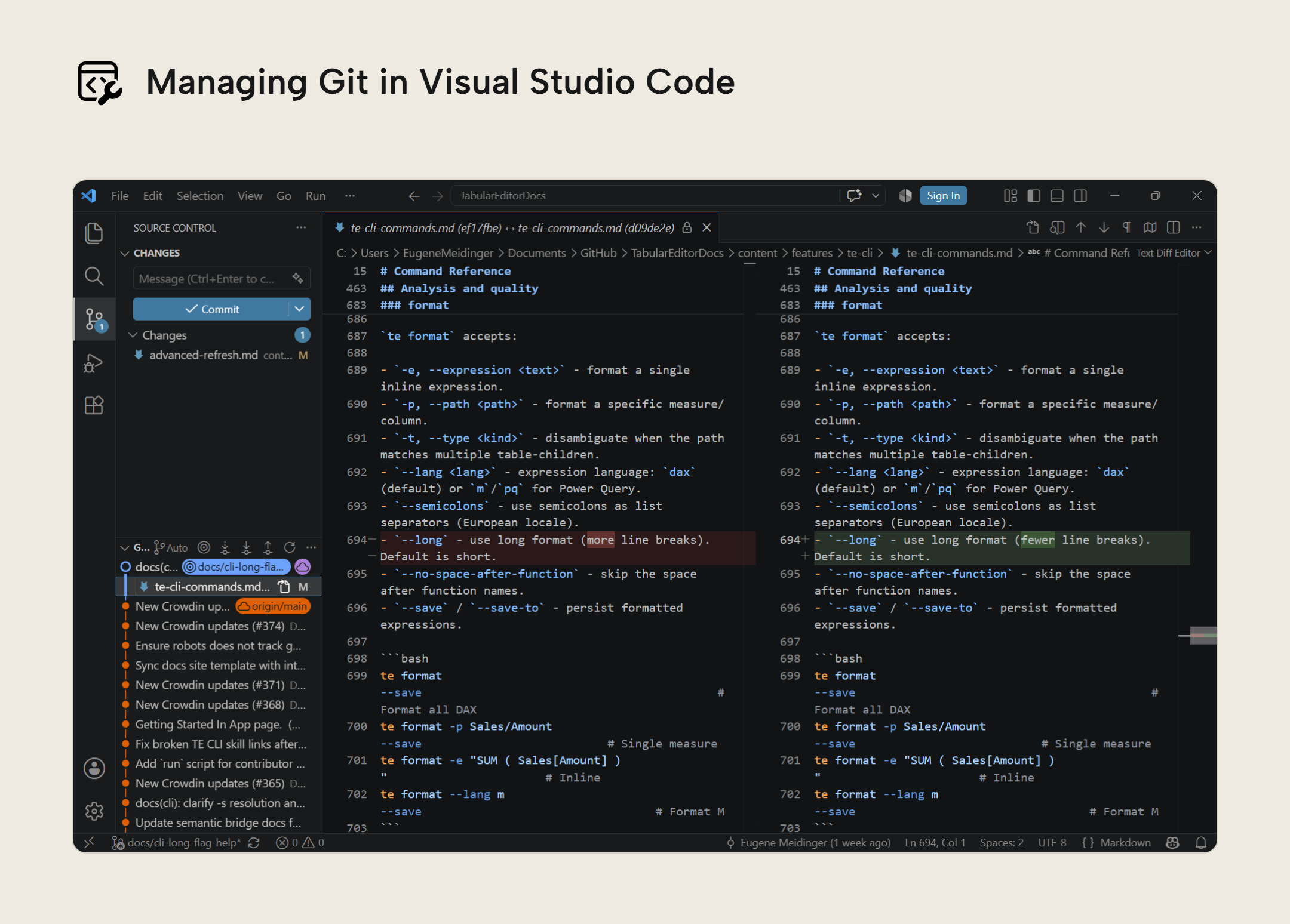
One thing to understand when you start using Git is that code is stored in a code repository, often a local folder that has been initialized by Git with some tracking files and folders. File changes are saved in checkpoints called commits. A commit is an atomic unit of work and can be as small as changing a formatting string or measure definition. Commits can optionally be “pushed” to a remote host, such as GitHub for backup and collaboration purposes. This is really all you need to know to start using Git as local version control.
TIP
Tabular Editor 3 does not have Git integration, so you will want to use an external tool to manage Git such as Visual Studio Code or TortoiseGit.
At this stage, you also should definitely have separate test and production workspaces for your semantic models and reports. Even if your test reports are also pointing at production data, any layer where you can break things should have a test environment to catch issues. You may also optionally want a third development workspace. What is important is that you are moving testing and error detection earlier and earlier in the process. It’s difficult to do this if you only have a production workspace.
Using deployment pipelines at this point is a good choice for moving reports and models from development to test to production. Azure Pipelines may make more sense if your organization is already set up with Azure DevOps. Azure Pipelines are more powerful and flexible, but require more setup and research.
Part of moving testing earlier means doing validation testing in your development environment, which may mean on your local machine. One great step is to start using the Best Practice Analyzer before you publish a report. This can be done with Tabular Editor 3 or the TE CLI, whichever you prefer. If you are using AI agents, the TE CLI is ideal because the Best Practice Analyzer is on by default for deployments, preventing your agent from deploying a model that doesn’t follow your rules.
NOTE
The TE CLI is in limited public preview and offered for evaluation with a Tabular Editor account. We recommend against using the CLI in production CI/CD pipelines during preview, as commands, flags, and outputs may change before general availability. The preview build will stop functioning after October 31, 2026. After the preview period, a license will be required. We welcome your feedback.
WARNING
If at all possible, you should avoid just pointing your AI agents at the TMDL files or PBIR files and definitely don’t let them edit the files raw. First, this is token-inefficient and more expensive. Second, because of how LLMs are fundamentally designed, they are not reliable for precise edits. Additionally, both formats have intricacies where a mistake can leave you with a report that won’t open.
Tools like Tabular Editor 3, the TE CLI, and the Power BI Modeling MCP all have safety guarantees built in. They are designed to never write invalid TMDL or model.bim JSON. It’s still quite possible to write DAX code that is nonsense, but your reports will at least open.
Silver-level maturity
The next level up generally requires getting buy-in from the rest of your team, whereas no one can really stop you from using Git and Tabular Editor locally, aside from your IT department perhaps.
The first step is choosing a source control provider. If you are using Microsoft Fabric’s built-in Git integration, the supported options are Azure DevOps and GitHub. By configuring a workspace to use a code repository, changes you make in the service will automatically be tracked and you can commit those changes from the service. This means it’s possible for developers on your team to start getting the benefits of source control without having to learn the commands.
If you are using a source control provider not integrated with Fabric or not supported by Fabric, then you’ll want to use the TE CLI and XMLA endpoints to deploy semantic models as part of your CI/CD process. You will also have to configure a Service Principal to authorize deployments. To deploy reports you will want to use the Power BI REST APIs. This approach makes the most sense when your organization is already well-established with a given provider. If you are starting fresh, it makes sense to go with a provider supported by Fabric instead.
Part of setting up source control for your team also requires choosing a branching strategy. A branching strategy is a plan for how you will take the source code and create isolated copies, called branches, and then recombine them, called merging. This allows for developing and testing small changes in isolation, reducing the risk of deploying partial work along with completed work. If you are used to working purely in Power BI Desktop, this will be a fairly novel concept since copying a PBIX file to make changes and then copying the changes back into the original file is tedious and risky.
TIP
Technically, if you are using Tabular Editor 3, copying between models is quite easy to do. That said, we still recommend taking advantage of source control since branching and merging are often a single command. AI Agents are also very skilled at working with Git and can handle a lot of the work for you.
With Fabric Git integration, there are at least three workspace and branching strategies you could take. First, you can maintain individual workspaces for development, testing, and production. While this is the simplest to set up, it doesn’t scale particularly well to large teams since you are all working in the same workspace with a risk of other people accidentally committing your work.
Second, you could create a development branch for each developer with a branched workspace tied to it. This reduces contention among developers but still requires each developer to be cautious about what work they commit and when. Otherwise, you get back to the issue of submitting big chunks of work at the same time.
A third option is to use feature branches and branched workspaces. This is where you create a new workspace for each meaningful chunk of work. Feature branches are extremely common in software development, but they are a bit more clunky in Fabric because you are provisioning an entirely new workspace. This approach is more robust than single developer branches but can be overwhelming. It also may require support from IT, since developers may not have permissions to make new workspaces.
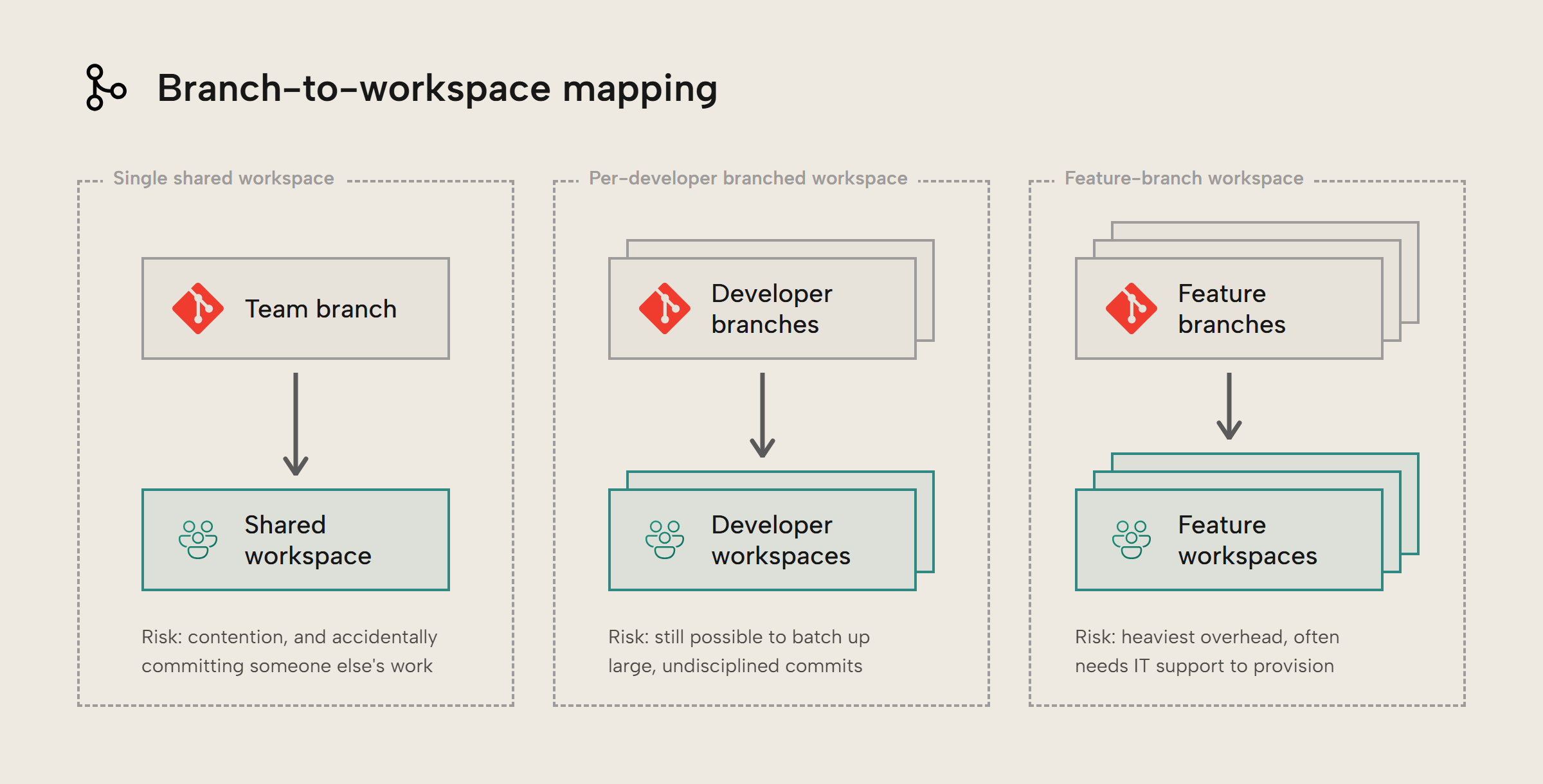
Lastly, this is a good stage to start adding very basic source control gates. These are automated tests and checks that prevent changes from moving forward if they don’t meet certain requirements or quality levels. A simple one is using the TE CLI to enforce that models pass Best Practice Analyzer rules. You can customize those rules or choose to only gate on the most severe violations. Doing this requires setting up an Azure DevOps Pipeline, GitHub Actions, or similar.
Gold-level maturity
Reaching a gold-level maturity is mainly about having a high level of consistency in applying your policies and exploring more advanced techniques. It also means treating semantic model development closer to professional software development. It is less prescriptive than the previous levels because you have more options and choices.
For a branching strategy, we recommend considering two combined techniques called GitHub Flow and Octopus Merge. GitHub Flow has short lived feature branches and when you want to make a merge, you make a “pull request”. A pull request is a feature of your Git provider where any reviewers can look at the changes and leave comments before choosing to merge or “pull” those changes in. Think of this as a polite way of saying “Hey can you take a look at these changes for me?”. The alterative would be to “push” your changes directly to the branch, without any review or approval.
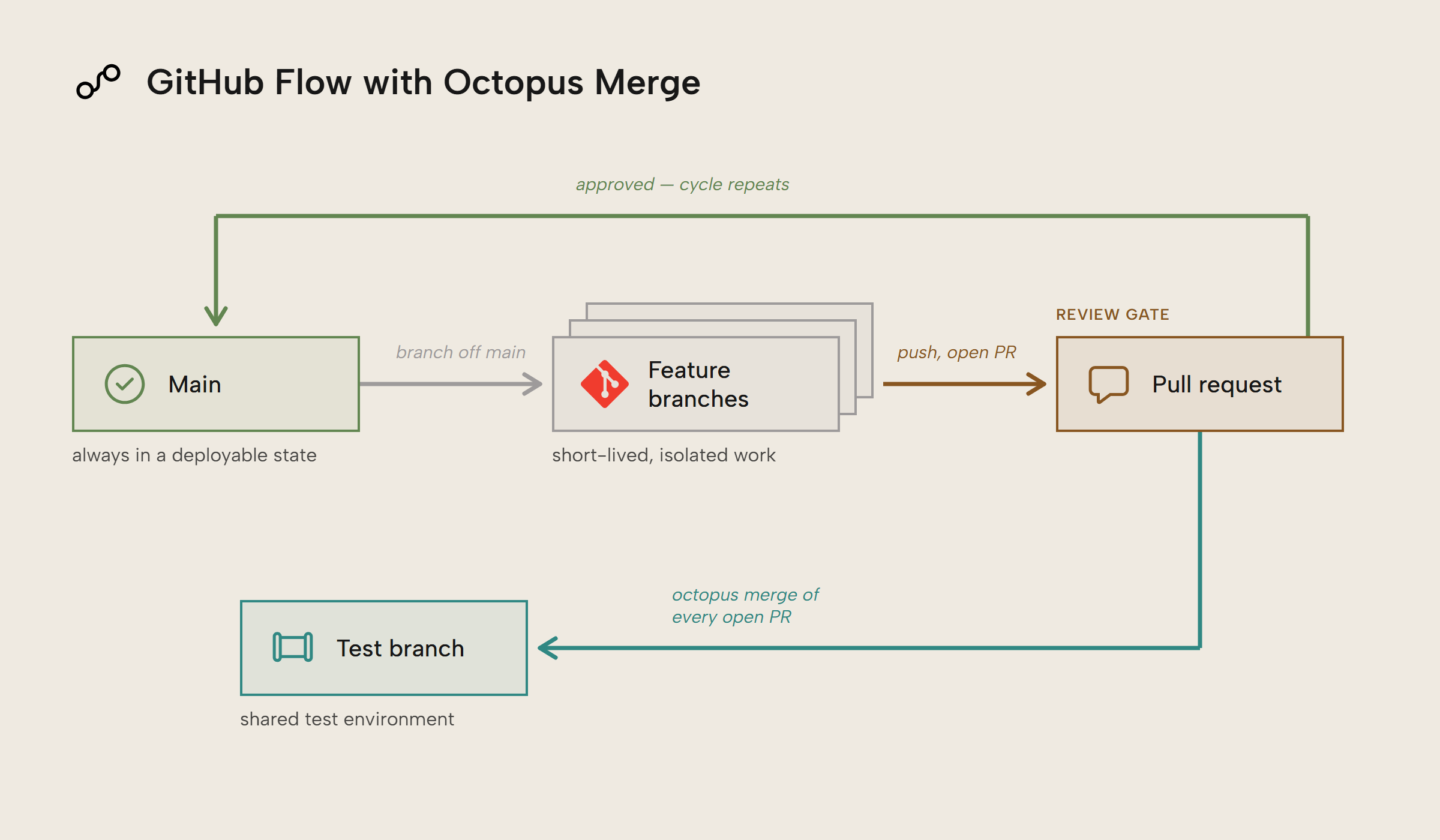
Octopus Merge adds a testing branch that is constantly running automated tests. When a developer wants to merge their feature work into the main branch, a continuous integration pipeline runs tests against the feature work.
This combination has a few benefits:
- Main is always in a good state, because tests have to pass before being merged in
- The test branch represents the combination of all the active work. This catches errors that only occur when features are combined.
- Merge conflicts, where two changes can’t be automatically combined, are rarer because feature branches are short lived. This means it’s less likely for two people to work on the exact same code at the same time.
Another piece is a matter of expanding out the types of automated tests you run. We already mentioned running the Best Practice Analyzer with the TE CLI. You can also do the following:
- Check for invalid reports with the
pbirCLI - Check for invalid models with
te validate - Enforce formatting with
te format - Run DAX assertions against a live model to make sure certain formulas return the right value. You can do this with
te test runor you can make something simple with Fabric notebooks and Semantic Link. - Catch structural changes with
te diff
Further reading
- Power BI implementation planning: Deploy content (Microsoft). Guidance about the various ways to deploy Power BI content from simple publish to full source control.
- Pro Git. (Git). Free and thorough book on how to use Git.
In conclusion
CI/CD allows you to deliver faster and more safely thanks to source control, testing environments, and automated testing. You don’t have to be a professional software developer or work in an enterprise to start making small step forward. CI/CD is crucial for safely working with AI agents as well.
Take your semantic models further with Tabular Editor.
Give Tabular Editor a spin